Clone in VS Code, Cursor and other editors
Add "Clone from Diffinery" to VS Code, Cursor, Windsurf and VSCodium, sign in with your passkey, and clone, push and publish without tokens.
When you clone a repository in VS Code or Cursor, the clone picker offers Clone from GitHub. The Diffinery extension adds Clone from Diffinery next to it, lists your repositories, and signs Git in for you, so clone, pull and push work without a token or password. It works in every editor built on VS Code: VS Code, Cursor, Windsurf, VSCodium and others.

1. Install the extension
Run this in a terminal on the computer with the editor. It installs the extension into every VS Code-based editor it finds:
curl -fsSL https://diffinery.com/install-editor | bashOn Windows, in PowerShell:
powershell -c "irm https://diffinery.com/install-editor.ps1 | iex"To install into one editor only, use the editor's own command:
| Editor | Command |
|---|---|
| VS Code | curl -fsSLo diffinery.vsix https://diffinery.com/-/vscode/diffinery.vsix && code --install-extension diffinery.vsix |
| Cursor | curl -fsSLo diffinery.vsix https://diffinery.com/-/vscode/diffinery.vsix && cursor --install-extension diffinery.vsix |
| Windsurf | curl -fsSLo diffinery.vsix https://diffinery.com/-/vscode/diffinery.vsix && windsurf --install-extension diffinery.vsix |
| VSCodium | curl -fsSLo diffinery.vsix https://diffinery.com/-/vscode/diffinery.vsix && codium --install-extension diffinery.vsix |
Without a terminal: download diffinery.vsix, open the Extensions view, choose … (Views and More Actions) → Install from VSIX…, and pick the file.
The extension comes from diffinery.com rather than a marketplace, and keeps itself up to date from there: once a day it checks for a newer build and offers to install it (checked against the SHA-256 that diffinery.com publishes).
2. Clone a repository
- Open the Command Palette (
Ctrl+Shift+P, orCmd+Shift+Pon a Mac) and run Git: Clone, or choose Clone Repository on the editor's welcome page. - Choose Clone from Diffinery.
- The first time, the editor asks to sign in with Diffinery. Choose Allow, then Sign in to diffinery.com (or Use another Diffinery server… for a self-hosted Diffinery): your browser opens Diffinery's consent page.
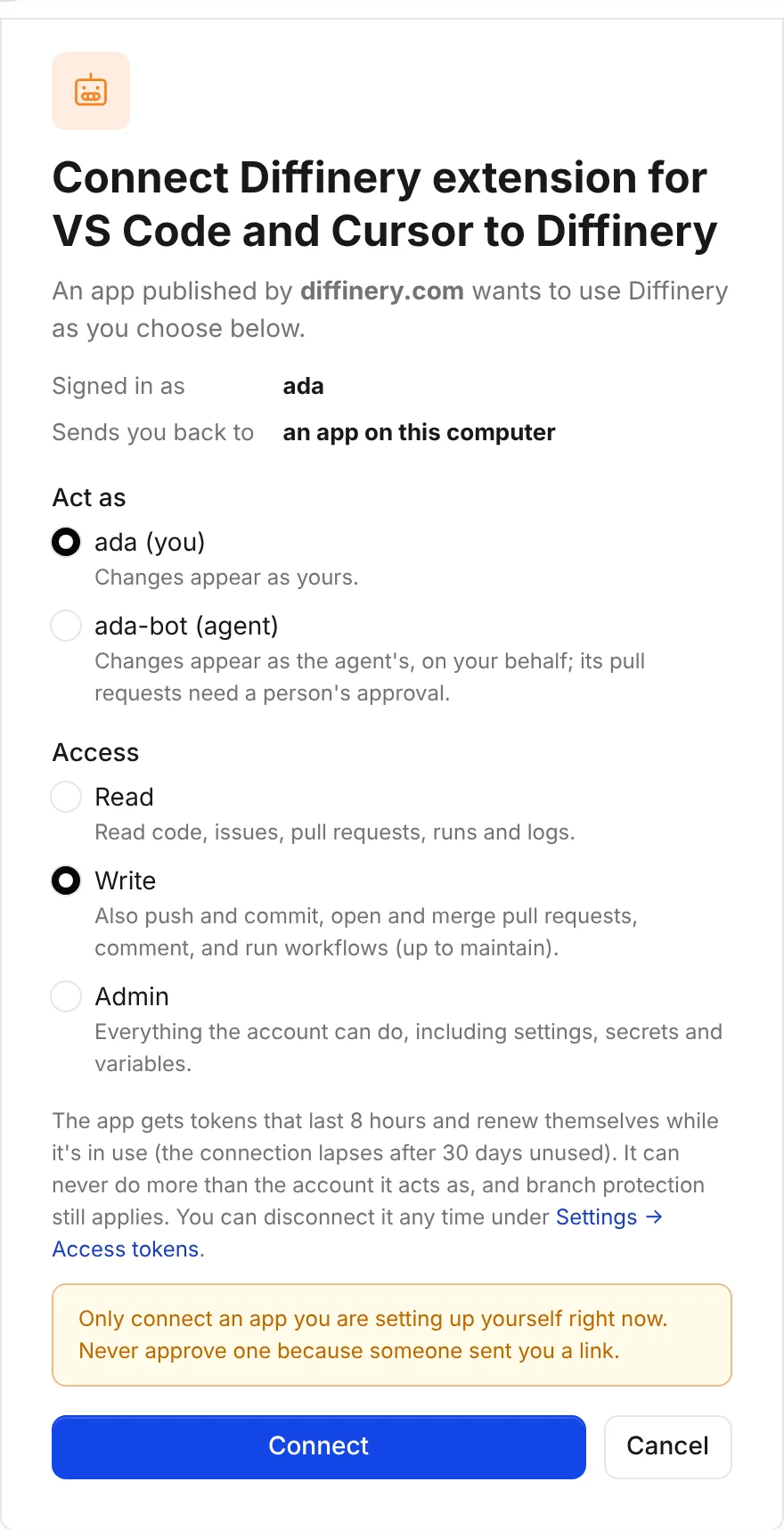
- On the consent page, check that it says Diffinery extension for VS Code and Cursor, published by diffinery.com, keep Act as set to you and Access set to Write, and choose Connect. The browser shows You're signed in to Diffinery; close the tab and go back to the editor.
- Back in the editor, pick a repository. The list shows your repositories and your organizations', most recently pushed first. Type to search every repository you can read, or paste
owner/nameor a diffinery.com link. - Choose a folder. The editor clones the repository and opens it.
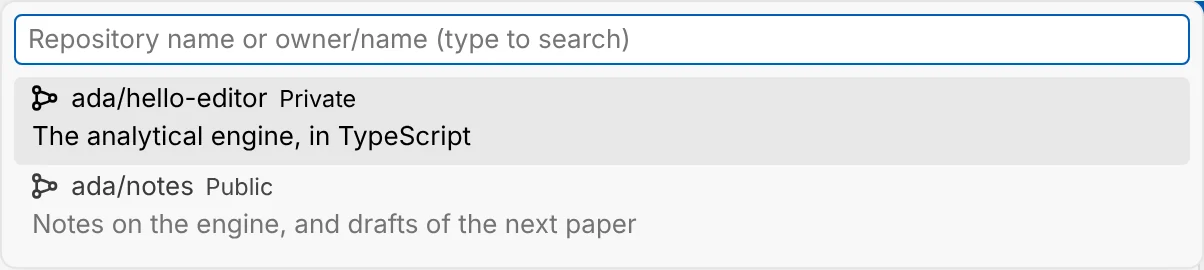
Diffinery: Clone Repository in the Command Palette goes straight to the Diffinery list.
Check that it works
- The Accounts menu (the person icon at the bottom of the Activity Bar) shows your Diffinery login.
- In the cloned repository,
git pullandgit pushin the editor's terminal or the Source Control view work without asking for a password. - On diffinery.com, Settings → Access tokens → Connected apps lists Diffinery extension for VS Code and Cursor.
Open in your editor from diffinery.com
Every repository's Clone box on diffinery.com has Open in VS Code, Cursor, Windsurf and IntelliJ IDEA buttons. They use the editors' own clone links, so they work even without the extension: your browser asks to open the editor, and the editor asks where to clone. For a private repository, the extension (or, in IntelliJ IDEA, the JetBrains plugin) signs Git in when Git asks; without it, Git asks for your username and an access token.
The links follow this pattern, if you want to put them in a README or a script:
vscode://vscode.git/clone?url=https%3A%2F%2Fdiffinery.com%2Facme%2Fwebsite.git
cursor://vscode.git/clone?url=https%3A%2F%2Fdiffinery.com%2Facme%2Fwebsite.git
windsurf://vscode.git/clone?url=https%3A%2F%2Fdiffinery.com%2Facme%2Fwebsite.git
jetbrains://idea/checkout/git?idea.required.plugins.id=Git4Idea&checkout.repo=https%3A%2F%2Fdiffinery.com%2Facme%2Fwebsite.gitPublish a local repository to Diffinery
In a repository that has commits but no remote, choose Publish Branch in the Source Control view (or run Git: Publish to…) and pick Publish to Diffinery. Choose the owner (you or one of your organizations), the name and whether it's private or public. The extension creates the repository, adds it as the origin remote and pushes the branch.
How sign-in and Git passwords work
- Signing in uses Diffinery's OAuth sign-in, the same one Claude and Codex use. The extension never sees your passkey. It gets a token that lasts 8 hours and renews itself while the editor runs; after 30 days unused the connection lapses and the editor asks you to sign in again.
- When Git needs a password for diffinery.com, the editor answers with your signed-in account. Git may save that password in your computer's credential helper (the macOS keychain, Git Credential Manager on Windows, libsecret on Linux). The extension keeps that saved copy current each time the token renews, and removes it when you sign out, so Git in a terminal keeps working while the editor is open.
- Diffinery: Sign Out, or signing out from the Accounts menu, disconnects the editor on Diffinery too. Disconnect under Settings → Access tokens → Connected apps does the same from the website.
- Diffinery: Sign In with an Access Token uses a token you paste instead, for an agent account or a browser-based editor. Create one under Settings → Access tokens with Write access. A pasted token isn't renewed and isn't revoked when you sign out.
Settings
| Setting | Default | What it does |
|---|---|---|
diffinery.serverUrl | https://diffinery.com | The Diffinery to sign in to. For a self-hosted Diffinery, its address; see below. |
diffinery.gitAuthentication | true | Answer Git's password prompts for the server with your signed-in account, and keep Git's saved copy current. |
diffinery.checkForUpdates | true | Check the server once a day for a newer build of the extension. |
Self-hosted Diffinery
The extension works with any Diffinery, such as one your company runs at https://git.example.com. Install it from your server, so it also updates itself from there:
curl -fsSL https://git.example.com/install-editor | bashOn Windows: powershell -c "irm https://git.example.com/install-editor.ps1 | iex".
Then point the extension at your server, in any of these ways:
- Installed with your server's script: when the extension starts, it asks The Diffinery extension was installed from https://git.example.com. Sign in, clone and push there? Choose Use git.example.com. (Editors can't set a setting from their command line, so the script leaves the address in
~/.config/diffinery/editor-server, or%USERPROFILE%\.config\diffinery\editor-serveron Windows, and the extension asks once.) - The first sign-in: the extension asks Which Diffinery do you use? Choose Use another Diffinery server… and enter the address, such as
git.example.com. - Any time: run Diffinery: Use Another Server… from the Command Palette and enter the address. Enter
diffinery.comto go back. - By hand: set
diffinery.serverUrltohttps://git.example.comin your user settings.
The extension checks that a Diffinery answers at the address before it uses it (an address must use https, except http://localhost for a server on your computer). Each server keeps its own sign-in, so switching back doesn't sign you out. Git's passwords are answered for the server in diffinery.serverUrl only.
JetBrains IDEs
IntelliJ IDEA, PyCharm, WebStorm, GoLand and the other JetBrains IDEs have their own Diffinery plugin, which adds Diffinery to Get from Version Control with the same passkey sign-in: see Clone in JetBrains IDEs.
Other editors and Git tools
Any Git client clones Diffinery repositories over HTTPS with your username and an access token: see Git. For Git in any terminal, even with the editor closed, let the diffinery CLI answer Git's password prompts: diffinery login, then diffinery auth setup-git. Git then asks the CLI first, and the editor's sign-in is used only inside the editor.
Troubleshooting
| What you see | What to do |
|---|---|
| No Clone from Diffinery in the picker | Check the extension is installed and enabled in the Extensions view, then reload the window (Developer: Reload Window). It needs the editor's built-in Git support (git.enabled). |
| The browser opens but the editor doesn't continue after Connect | The browser hands the answer to the editor on a one-time address on your computer (127.0.0.1). Make sure the editor is still running and the sign-in notification is still showing, then try again. A firewall or proxy that blocks local addresses stops it; use Diffinery: Sign In with an Access Token instead. |
| "This app isn't registered with Diffinery" on the consent page | diffinery.serverUrl points at a server that doesn't have the editor sign-in yet. Use Diffinery: Sign In with an Access Token, or update the server. |
| Git still asks for a password | Check diffinery.gitAuthentication is on, and that the remote URL is on diffinery.com (git remote -v). An old saved password for diffinery.com in your keychain can win; remove it, and the extension's renewals keep the new one current. |
Authentication failed once after the editor was closed for hours | Git used a saved token that had expired; it has now forgotten it. Run the command again, from the editor. |
| An editor that isn't listed (another VS Code fork) | It works the same way: the extension needs only the editor's built-in Git support. |
For AI agents reading this page
- To clone a Diffinery repository yourself, use Git with a token (
git clone https://diffinery.com/OWNER/REPO.git, with your token as the password through a credential helper), or the MCP server's tools. The extension is for people using an editor. - When a person asks how to open a Diffinery repository in VS Code, Cursor or Windsurf, point them to this page: they run
curl -fsSL https://diffinery.com/install-editor | bash, then Git: Clone → Clone from Diffinery. Don't try to complete the browser sign-in for them. - For a self-hosted Diffinery, they run the same script from their server (
curl -fsSL https://git.example.com/install-editor | bash) and choose Use git.example.com when the editor asks, or run Diffinery: Use Another Server…. Don't edit theirsettings.jsonfor them. - For connecting an editor's AI (Cursor's agent, VS Code's Copilot Chat) to Diffinery's MCP server, see Other apps.