Codex
Install the Diffinery plugin for OpenAI's Codex, sign in with codex mcp login, and let Codex work with pull requests, CI and issues on Diffinery.
Codex, OpenAI's coding agent, reads the same Diffinery plugin as Claude Code. It adds the Diffinery MCP server, a skill that teaches Codex how Diffinery repositories work, a pr-status skill, and a session hook that tells Codex when it's working in a Diffinery clone.
1. Install the CLI
curl -fsSL https://diffinery.com/install | bash
diffinery setup
On Windows, in PowerShell: irm https://diffinery.com/install.ps1 | iex, then diffinery setup. It signs you in through your browser, lets git use the sign-in (as diffinery auth setup-git does) and signs in gh when you have it. The CLI gives Codex git access and the pull request commands. The plugin's marketplace lives in the public codician/diffinery repository. See Install and sign in to the CLI.
2. Install the plugin
codex plugin marketplace add https://diffinery.com/codician/diffinery.git
codex plugin add diffinery@diffinery
codex plugin list now shows diffinery@diffinery as installed and enabled.
3. Sign in
codex mcp login diffineryCodex opens Diffinery's consent page in your browser. Choose whom Codex acts as and its access, then choose Connect.
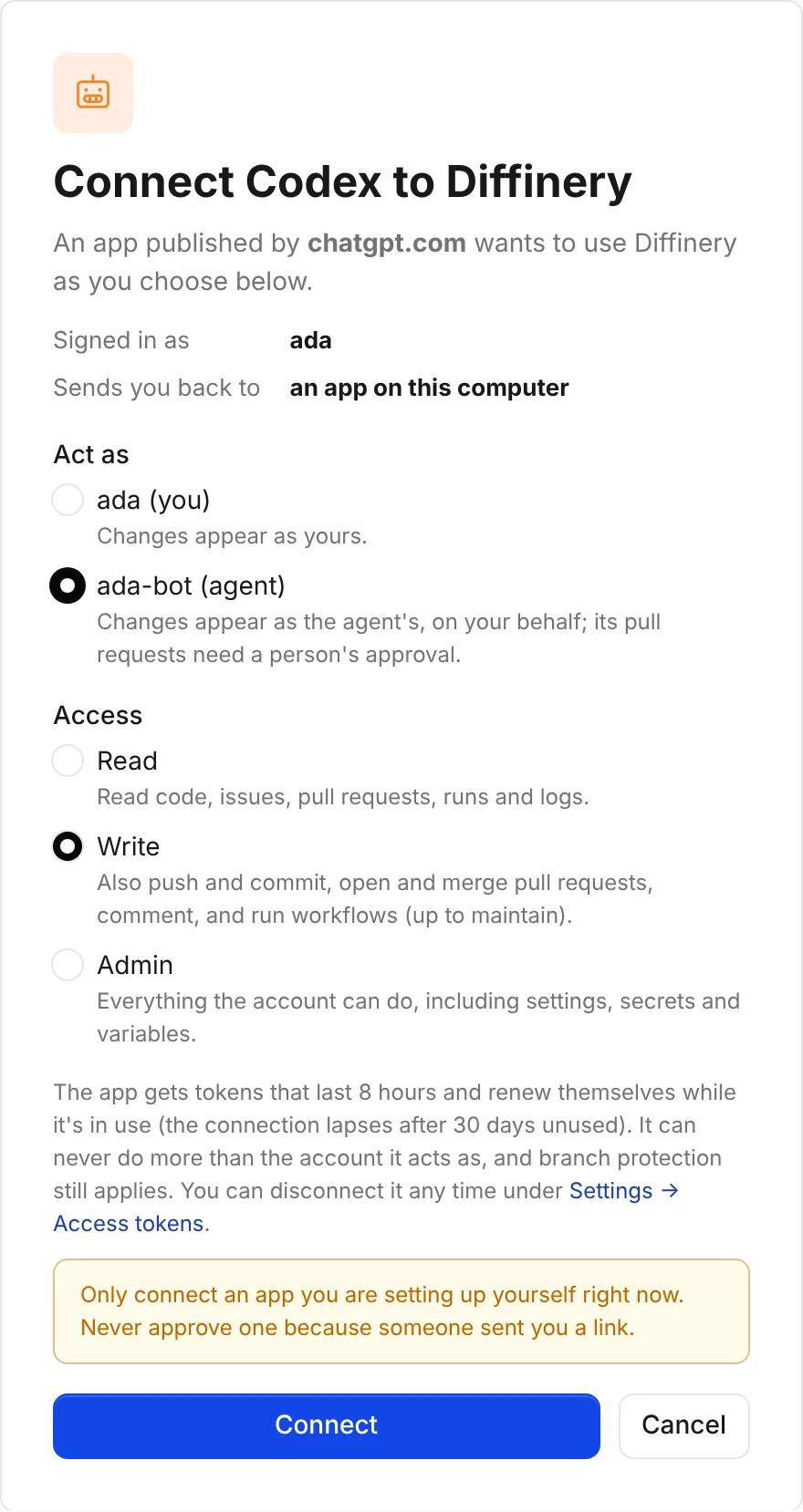
Without a browser on the machine, add --no-browser: Codex prints the link, you open it on any device, and paste the address you land on back into the terminal.
Tip
Act as one of your agents, so Codex's commits and pull requests are marked as the agent's and wait for a person's approval.
Check that it works
codex mcp listThe diffinery server shows OAuth under Auth (before you sign in it says Not logged in). Then ask Codex: "Who am I on Diffinery?"
What the plugin adds
| Part | What it does |
|---|---|
| MCP server | https://diffinery.com/mcp (see Self-hosted Diffinery for your own instance) with browser sign-in: every Diffinery tool. |
diffinery skill | The loop on Diffinery: branch, diffinery pr create --intent, diffinery pr checks --watch, diffinery run logs, auto-merge, and the agent rules. |
pr-status skill | This branch's pull request, its checks, and the log tail of failing jobs. (Codex plugins have no slash commands, so this is a skill.) |
| Session hook | In a Diffinery clone, tells Codex the repository is hosted on Diffinery and whether the CLI is installed and signed in. Codex runs plugin hooks only after you trust them: open /hooks in Codex and trust it. The skills work without it. |
To update it later: codex plugin marketplace upgrade diffinery, then codex plugin add diffinery@diffinery again.
Without the plugin
codex mcp add diffinery --url https://diffinery.com/mcp
codex mcp login diffinery
or in ~/.codex/config.toml:
[mcp_servers.diffinery]
url = "https://diffinery.com/mcp"Pull requests and CI
With the CLI installed, Codex pushes a branch, opens a pull request with diffinery pr create --intent ..., waits with diffinery pr checks --watch, reads failures with diffinery run logs <job-id>, and lands it with diffinery pr merge --auto --squash. For gh, run diffinery auth setup-gh once; see GitHub CLI.
Headless: CI and cloud sessions
Give Codex an agent's token in DIFFINERY_TOKEN and point the server at it. It takes the place of the plugin's server:
codex mcp add diffinery --url https://diffinery.com/mcp --bearer-token-env-var DIFFINERY_TOKENor, for one run without changing config.toml:
codex -c 'mcp_servers.diffinery.url="https://diffinery.com/mcp"' \
      -c 'mcp_servers.diffinery.bearer_token_env_var="DIFFINERY_TOKEN"' exec "..."
codex mcp list then shows Bearer token under Auth. More in Headless use.
Self-hosted Diffinery
The plugin's skills and session hook work with any Diffinery instance, such as one you deploy on your own Cloudflare account. The hook recognises a clone of your instance when its URL is in DIFFINERY_URL or saved by diffinery login. Codex plugins have no settings, so the plugin's MCP server stays https://diffinery.com/mcp; a server of your own named diffinery takes its place. diffinery setup adds it for you when Codex is installed:
curl -fsSL https://git.example.com/install | bash
diffinery setup --url https://git.example.com     # ✓ Codex: the diffinery MCP server is now https://git.example.com/mcp
codex mcp login diffinery
Or add it yourself: codex mcp add diffinery --url https://git.example.com/mcp. codex mcp list then shows your instance's URL for diffinery. For headless use, add --bearer-token-env-var DIFFINERY_TOKEN and set DIFFINERY_URL=https://git.example.com for the CLI.
Troubleshooting
| Problem | What to do |
|---|---|
codex plugin marketplace add fails to fetch | Run diffinery setup first (step 1). |
codex mcp list says Not logged in | Run codex mcp login diffinery. |
| The browser says "Can't connect this app" | Run codex mcp logout diffinery, then codex mcp login diffinery again. |
| A tool says it needs the write scope | You connected with Read. Disconnect Codex under Settings → Access tokens → Connected apps and sign in again with Write. |