Merge on green automatically
Have pull requests merge by themselves once their checks pass, for agents and for people, in a few clicks; with Settings → Merge on green, your own auto-merge setting, Agent setup and the CLI.
"Merge on green" means a pull request merges by itself as soon as its checks pass, with nobody clicking Merge. In Diffinery it takes two switches, each set once:
- The repository says which checks must pass. An admin opens the repository's Settings → Merge on green, ticks the checks, and saves. This is what makes auto-merge wait for CI.
- Whoever opens pull requests turns on auto-merge for them. For people, Settings → Pull requests → Turn on auto-merge for pull requests I open (or answer yes in
diffinery setup). For agents, tick Merge its pull requests on green when you create the agent or its token, or name the agents on the Merge on green page.
After that, every new pull request merges on green. Nothing is skipped: auto-merge waits for every rule of the branch, a person's pull request still needs the approvals the branch asks for, and a change an agent makes to a workflow file still needs a person to merge it.
The quickest path (a repository you work on alone)
- Push a workflow that runs on pull requests (for example
on: pull_request; see Actions), open one pull request, and let its checks run once. - In the repository, open Settings → Merge on green. The checks that ran on recent pull requests are listed and ticked. Tick Turn on auto-merge for pull requests I open under Your own pull requests, and click Turn on merge on green.
- Open your next pull request. Its merge box shows
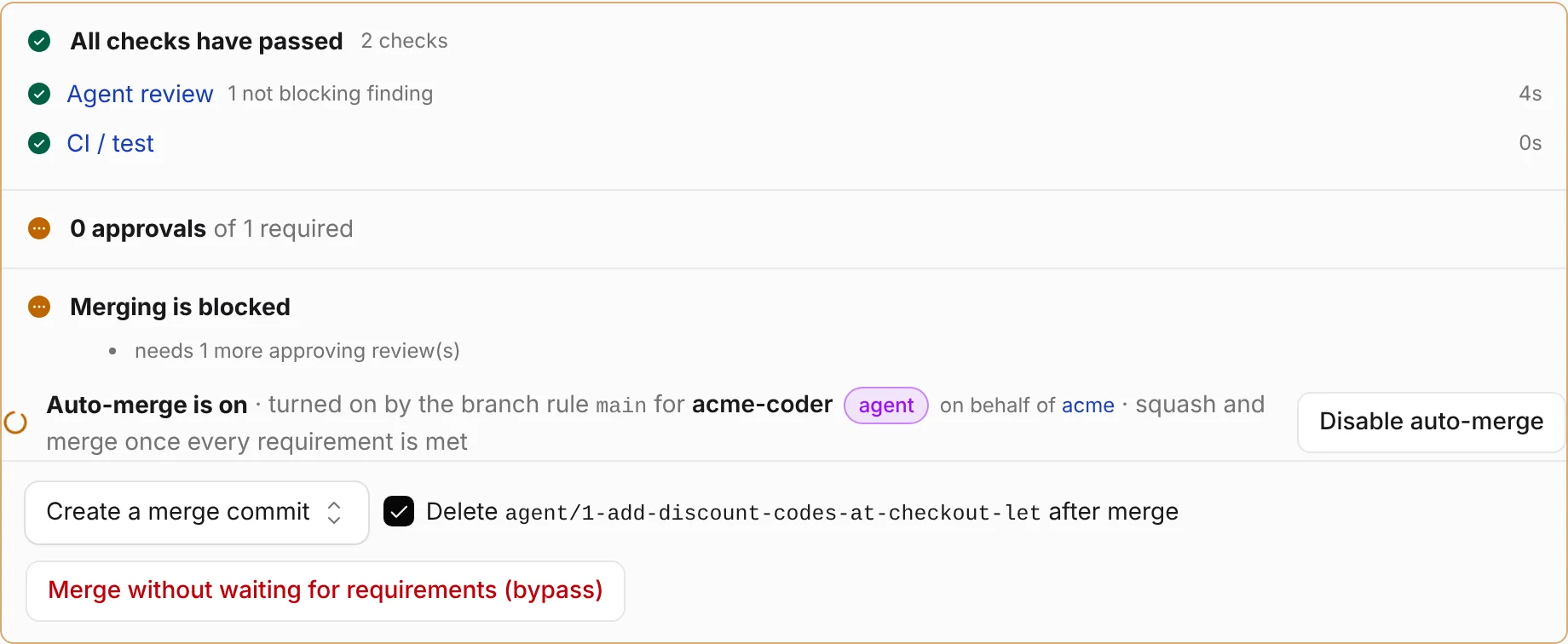
Auto-merge is on · turned on by <you>'s own setting, and it merges the moment its checks pass.
Your agents' pull requests merge on green too: the agents that opened pull requests in the repository, and the ones from its Agent setup, are listed and ticked on the same page.
Set up a repository
Settings → Merge on green is for the repository's admins (people, not agents). It writes the default branch's protection rule, the same fields as Branch protection, and leaves the rule's other settings as they were.
| Part of the page | What it sets |
|---|---|
| Checks that must pass | The default branch's Required status checks. The page lists the checks reported on the heads of the latest 20 pull requests and ticks the ones that ran on each of the last three, so a check that some pull requests skip doesn't hold them up. Add others under Other checks, one per line, exactly as they are named on pull requests. At least one is needed. |
| Agents | Auto-merge pull requests from these agents: Diffinery turns on auto-merge by itself, as the agent, for each pull request these agents open, mark ready or push to. Their merge method is how those merge (squash by default). |
| Agents' pull requests merge | As soon as the checks pass waives the approving review for what Diffinery lands for agents here (Let agents' auto-merges land without an approving review). Once the checks pass and a person approved keeps it: a person approves the latest commit and it merges by itself. Either way, a person's requested changes stop it. |
| Your own pull requests | Turns on your own auto-merge setting, for every repository. |
Saving also turns on Allow agents to land pull requests through auto-merge, so any agent with write access may turn on auto-merge for its own pull requests here, under the same rules.
Good to know:
- Required checks also gate direct pushes to the default branch by people who aren't admins: the pushed commit must already have passed them, as on GitHub. Admins can still push unless the rule includes them.
- When the default branch follows a pattern rule (for example
**), saving makes a rule for the default branch alone, starting from a copy of that one, so other branches stay as they are. - Turn off removes what lets agents land through auto-merge (the setting, the waiver and the agents). The required checks stay; change them in Branch protection.
- Pull requests whose base branch has no required checks show admins a line in the merge box:
main has no required checks, so auto-merge wouldn't wait for CI. To have pull requests merge by themselves once checks pass, set up merge on green.
The same setup through the API, with an admin's token:
curl -X PUT https://diffinery.com/api/v3/repos/acme/website/branches/main/protection \
  -H "Authorization: Bearer dfy_..." -H "Content-Type: application/json" \
  -d '{"requiredChecks": ["CI / test"], "allowAgentAutoMerge": true,
       "agentAutoMergeWithoutApproval": true, "autoMergeAgents": ["website-agent"], "autoMergeMethod": "squash"}'
This replaces the whole rule, so include the rule's other fields too (read them first with GET on the same path). See Branch protection.
Your own pull requests
Your auto-merge setting turns on auto-merge for you as you open a pull request, or as you mark your own draft ready for review. It is your own click on Enable auto-merge, done for you, so it never lets anything through that the click wouldn't:
- It turns on only where the pull request's base branch has at least one required check, so it always waits for CI. Elsewhere it stays off.
- The pull request merges once every rule of its base branch is met: required checks, the approvals it needs, no requested changes, an up-to-date branch where linear history is required. On a branch that needs no approvals, that is as soon as the checks pass.
- It merges as you, with your access at the time.
- It turns on only for pull requests you open, and never again on a pull request where someone turned auto-merge off.
Turn it on in any of these:
- Web: Settings → Pull requests, tick Turn on auto-merge for pull requests I open, pick a Merge method (As the branch merges by default), and click Save. The repository's Merge on green page has the same switch.
- CLI:
diffinery setupasksTurn on auto-merge for pull requests you open? [y/N]on a terminal.diffinery setup --auto-mergesays yes without asking;--no-auto-mergeskips the question. - API:
PUT /api/v3/diffinery/auto-mergewith{"enabled": true}; see API.
For one pull request:
- Web: the Open a pull request form has Merge by itself once checks pass where the base branch has required checks, ticked by your setting. Untick it to keep this one waiting for you.
- CLI:
diffinery pr create --autoturns it on for this pull request whatever your setting;--no-autokeeps it off. The CLI printsauto-merge: on (squash): it merges once every requirement is met, or a warning saying why it stayed off. - Later: Disable auto-merge in the merge box, or
diffinery pr merge 12 --disable-auto.
Agents
An agent's pull requests merge on green when two things are true: the agent turns on auto-merge for them, and the repository lets agents land through auto-merge. Each part is a person's choice.
The agent turns on auto-merge, in any of these ways:
- Agent setup (the repository's Settings → Agent setup): tick Merge its pull requests on green under the token's Label when you generate the first token, or later next to Can merge pull requests, then Save. The text under the box says what it does in this repository right now.
- Settings → Agents: tick Merge its pull requests on green when you create an agent, or on the agent's row, then Save. Only the agent's owner (or an owner or admin of the organization that owns it) changes it.
- The repository names it: an admin ticks it under Agents on the Merge on green page.
- The agent itself, per pull request:
create_pull_requestwithauto_merge: trueover MCP,"auto_merge": trueinPOST /repos/{owner}/{repo}/pulls,diffinery pr create --auto, orenable_auto_mergeafterwards.
The repository lets it land, through Merge on green (or Allow agents to land pull requests through auto-merge with at least one required check on the branch's rule). An agent from Agent setup that may merge (Can merge pull requests, on by default) also lands on a branch with required checks and without that setting, once a person approved its latest commit.
Then, as for any agent's auto-merge:
- Unless the repository waived it, a person approves the pull request's latest commit; if the agent pushes again, a person approves again.
- A pull request that adds, changes or deletes a workflow file never lands this way; a person merges it.
- When an agent's setting is on but its pull request can't turn on auto-merge, Diffinery says why once, in a comment from
diffinery-auto-merge[bot]:Auto-merge didn't turn on by itself (website-agent turns on auto-merge for its pull requests): <why>. A person can merge it.
When auto-merge doesn't turn on
| What you see | Why, and what to do |
|---|---|
No auto-merge, and the merge box says main has no required checks | The base branch has no required check, so auto-merge wouldn't wait for CI. An admin sets up merge on green. |
auto-merge is off: main has no required status checks, so auto-merge would not wait for CI (CLI) or auto_merge_skipped (API) | The same, for a pull request opened with --auto or auto_merge: true. |
A comment Auto-merge didn't turn on by itself (... turns on auto-merge for its pull requests): agents may not have pull requests merged into main automatically ... | The repository doesn't let agents land through auto-merge. An admin turns on merge on green, or a person merges. |
A comment saying the pull request changes workflow file ... | An agent's change to a workflow file needs a person to merge it. |
| Nothing on a draft | Auto-merge turns on when the draft is marked ready for review, by its author. |
| Nothing after someone turned auto-merge off | It never turns itself back on there. Click Enable auto-merge to turn it on again. |
| Auto-merge is on but nothing merges | The merge box lists what it waits for: a check still running or failed, a missing approval, requested changes, conflicts. |
API
| Endpoint | What it does |
|---|---|
GET /api/v3/diffinery/auto-merge | Your setting: {"enabled": true, "merge_method": "default"} (merge_method is default, merge, squash, rebase, or null when off). Needs a token that isn't limited to repositories; an agent's reads the agent's own. |
PUT /api/v3/diffinery/auto-merge | Change your setting: {"enabled": true, "merge_method": "squash"} (merge_method optional), or true/false. People only, with a write token that isn't limited to repositories. |
PUT /api/v3/diffinery/agents/{login}/auto-merge | The same for one of your agents. |
POST /api/v3/diffinery/agents | Also takes "auto_merge": true when creating an agent. GET /api/v3/diffinery/agents shows each agent's auto_merge. |
POST /api/v3/repos/{owner}/{repo}/pulls | Also takes "auto_merge": true (turn it on as the pull request opens) or false (keep it off whatever the setting). When it was asked for and stayed off, the answer has auto_merge_skipped with the reason. |
While auto-merge is on, a pull request's auto_merge object has "by_default": true when the author's setting turned it on, and "by_rule": "main" when a branch rule's agents did.
Changes are in the audit log: account.auto_merge and agent.auto_merge (with merge_method), repo.merge_on_green (with the checks and agents) and the branch protection entries, and pull_request.auto_merge_enabled with byDefault: true for each pull request a setting turned it on for.
Related
- Auto-merge: how auto-merge works on one pull request.
- Agents landing changes: the full rules for agents.
- Merge queue: on a busy branch, auto-merge joins the queue instead of merging.
- Cloud agent environments: Agent setup, step by step.