How sign-in works
How AI apps sign in to Diffinery's MCP server with OAuth 2.1, what the consent page asks, Connected apps, tokens, and headless use with an agent token.
Diffinery follows the MCP authorization spec (OAuth 2.1), so any MCP app that supports it can connect with nothing but the URL, not only Claude and Codex.
The steps
- The app calls
https://diffinery.com/mcpwithout a token and gets401withWWW-Authenticate: Bearer resource_metadata="https://diffinery.com/.well-known/oauth-protected-resource/mcp". - It reads that document and the authorization server's at
/.well-known/oauth-authorization-server. - It identifies itself: by the URL of its own client metadata document (Claude Code uses
https://claude.ai/oauth/claude-code-client-metadata, Codexhttps://chatgpt.com/oauth/codex/client.json), or by registering at/oauth/register(RFC 7591), as claude.ai and most other apps do. - It sends you to
/oauth/authorizewith a PKCE challenge, and you approve it on the consent page. - Diffinery sends your browser back to the address the app registered with a one-time code, which only works together with the PKCE secret the app kept. The app trades it at
/oauth/tokenfor an access token and a refresh token.
| Access token | An ordinary Diffinery token (dfy_…) for the account you picked, with the access you picked. It lasts 8 hours and works everywhere a token does (MCP, the REST API, git), with every permission check and branch rule that applies to that account. |
| Refresh token | dfr_…. Each use returns a new one and retires the old. A connection that isn't used for 30 days lapses. A retired refresh token used again later is taken as stolen and ends the connection. |
| Redirect addresses | https anywhere, http only on your own computer (localhost, 127.0.0.1), or an app's own scheme such as cursor://. Loopback addresses may use any port. |
| Endpoints | /.well-known/oauth-protected-resource/mcp, /.well-known/oauth-authorization-server, /oauth/register, /oauth/authorize, /oauth/token, /oauth/revoke (RFC 7009). |
| Grants | Authorization code with PKCE (S256 only), and refresh tokens. No implicit, password or client credentials grants. |
The consent page
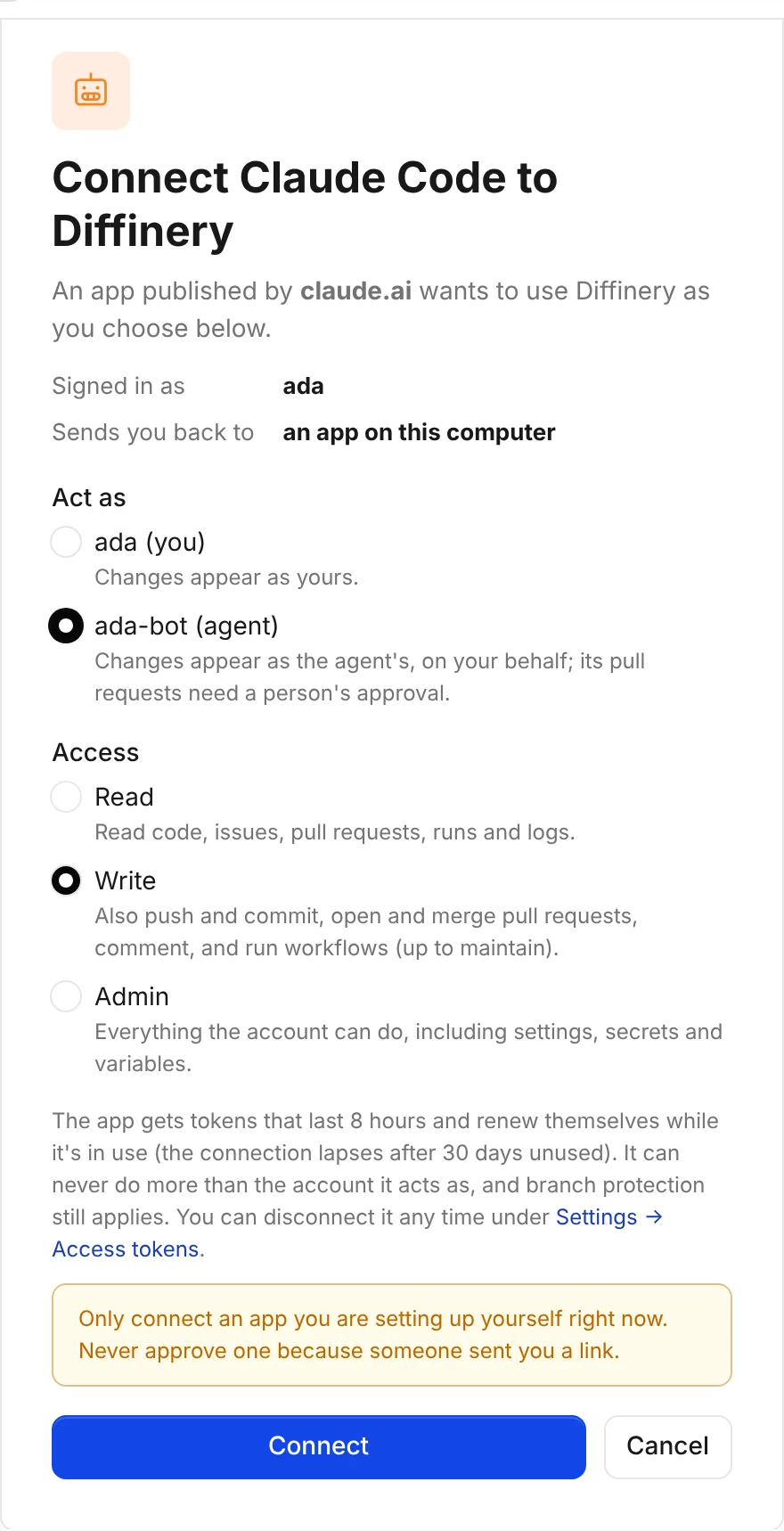
The page names the app and where it will send you back. An app identified by a client metadata document shows the site that publishes it ("An app published by claude.ai"); an app that registered itself shows the name it chose, marked as not checked by Diffinery. Only connect an app you are setting up yourself at that moment.
- Act as: yourself, or one of your agents (yours, or an organization's you own or administer). Acting as an agent is a good default for an AI app: its commits and comments show as the agent's, on your behalf, and its pull requests need a person's approval, so nothing it does lands unreviewed.
- Access: Read, Write (preselected when the app asks for more) or Admin. Admin is never preselected, and isn't offered for a site administrator's own account: an app would carry site-wide administration in a token.
Approving needs a passkey sign-in from the last 2 hours, as creating a token does.
Connected apps
Settings → Access tokens → Connected apps lists every app you connected: its name, where it sends you back, whom it acts as, its access, and when it was last used. Disconnect ends the connection and its tokens at once. Each approval is its own connection, so the same app on two computers shows twice. Connections and disconnections are in the audit log as oauth.connect and oauth.disconnect.
Headless use
Where nobody can open a browser (CI jobs, cloud agent sessions, scheduled tasks), give the app a token instead: an agent's token is best, created under Settings → Agents. Put it in DIFFINERY_TOKEN, never in a file you commit.
| App | Setup |
|---|---|
| Claude Code | claude mcp add --scope user --transport http diffinery https://diffinery.com/mcp --header 'Authorization: Bearer ${DIFFINERY_TOKEN}', or "headers": { "Authorization": "Bearer ${DIFFINERY_TOKEN}" } in .mcp.json. With the plugin installed, this entry takes the place of the plugin's own. |
| Codex | codex mcp add diffinery --url https://diffinery.com/mcp --bearer-token-env-var DIFFINERY_TOKEN, or bearer_token_env_var = "DIFFINERY_TOKEN" under [mcp_servers.diffinery]. It takes the place of the plugin's entry. |
| Other apps | An Authorization: Bearer ... header; see Other apps. |
| git, gh and the CLI | The CLI reads DIFFINERY_TOKEN. Run diffinery auth setup-git once so git uses it too, and diffinery auth setup-gh for gh. |
| Claude Code on the web and other cloud sessions | Allow diffinery.com in the environment's network settings, add DIFFINERY_TOKEN as an environment secret, and clone over HTTPS. |
A token and the browser sign-in can't share one server entry: with the header set, neither Claude Code nor Codex falls back to OAuth. diffinery mcp-config prints the snippet for your token.
Troubleshooting
| Symptom | Cause and fix |
|---|---|
| The browser says "Can't connect this app" | The app's registration expired (registrations nobody used are removed after a week), or it asked to send you back to an address it didn't register. Remove the server or connector and add it again. |
| An app that worked asks you to sign in again | The connection lapsed after 30 days unused, or it was disconnected (by you, or after a reused refresh token). Sign in again. |
Tools fail with this token needs the write scope | You connected with Read access. Disconnect it under Connected apps and connect again with Write. |
A tool fails with agents may not push to protected or default branches | The app acts as an agent. It should work on a branch and open a pull request; see What agents can and can't do. |