Claude Code
Install the Diffinery plugin for Claude Code, sign in from /mcp, and let Claude push branches, open pull requests and follow CI on Diffinery.
The Diffinery plugin for Claude Code adds the Diffinery MCP server, a skill that teaches Claude how Diffinery repositories work, a /diffinery:pr-status command, and a hook that tells Claude when the repository it's in is hosted on Diffinery. Together with the diffinery CLI, Claude can then push a branch, open a pull request, watch CI and fix what fails, without leaving the terminal.
1. Install the CLI
The CLI gives Claude git access and the pull request commands, and the plugin's source is fetched with git:
curl -fsSL https://diffinery.com/install | bash
diffinery setup
On Windows, in PowerShell: irm https://diffinery.com/install.ps1 | iex, then diffinery setup. It opens your browser to sign in (on a machine without one it shows a code to enter instead), runs diffinery auth setup-git so git pushes and pulls with the same sign-in, signs in gh when you have it, and adds the Diffinery plugin and the diffinery-ci plugin to Claude Code. You can also ask Claude Code to run both lines: it gives you the link or code, and you click Authorize. See Install and sign in to the CLI.
2. The plugin
diffinery setup installed it: its last lines include ✓ Claude Code plugins: diffinery … and diffinery-ci … load in new Claude Code sessions. Start a new Claude Code session (or run /reload-plugins in an open one), and /plugin lists diffinery and diffinery-ci. Run diffinery setup again to bring them up to date.
You can also install from the marketplace kept in the public codician/diffinery repository, which /plugin then keeps up to date: claude plugin marketplace add https://diffinery.com/codician/diffinery.git, then claude plugin install diffinery@diffinery. The plugins' sources are in its plugins/ folder.
3. Sign in
- In Claude Code, run
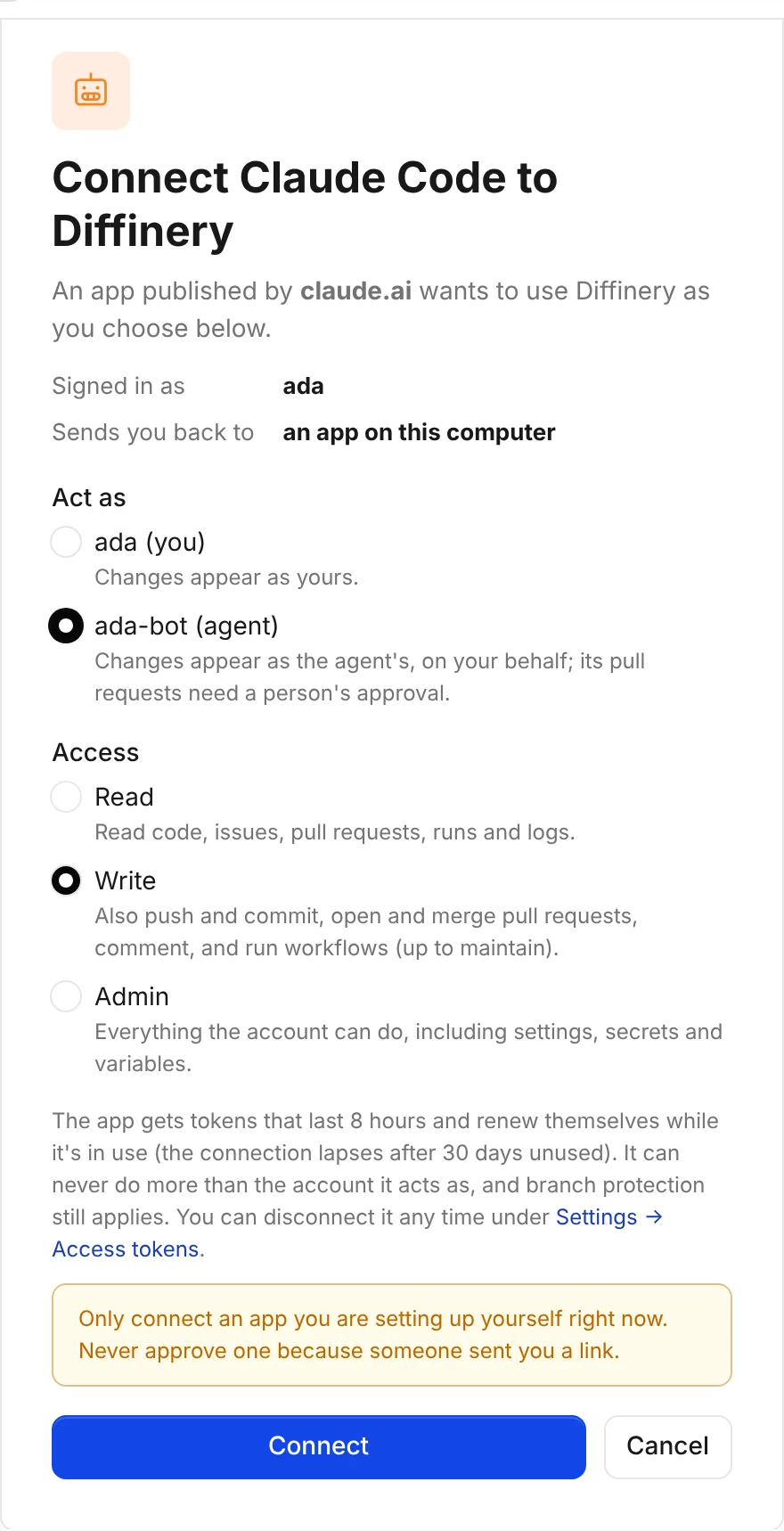
/mcp, select plugin:diffinery:diffinery and choose Authenticate. - Your browser opens Diffinery's consent page. Choose whom Claude Code acts as and its access, then choose Connect.
- Back in the terminal,
/mcpshows the server as connected.
On a machine without a browser, run claude mcp login plugin:diffinery:diffinery --no-browser (or claude mcp login diffinery without the plugin), open the printed link on any device, and paste the address you land on back into the terminal.
Tip
Act as one of your agents. Claude Code's commits, comments and pull requests then show as the agent's, and they wait for a person's approval before they land.
Check that it works
claude mcp listplugin:diffinery:diffinery shows Connected (before you sign in it shows Needs authentication). Then try it:
claude -p "Who am I on Diffinery?"In a clone of a Diffinery repository, /diffinery:pr-status shows the current branch's pull request, its checks, and the end of the log of any job that failed.
What the plugin adds
| Part | What it does |
|---|---|
| MCP server | https://diffinery.com/mcp (or your own instance's) with browser sign-in: every Diffinery tool. |
diffinery skill | Teaches Claude the loop on Diffinery: branch, diffinery pr create --intent, diffinery pr checks --watch, read failing logs with diffinery run logs, auto-merge, and what agents can and can't do. |
/diffinery:pr-status | This branch's pull request, its checks, and the log tail of failing jobs. Changes nothing. |
| Session hook | In a Diffinery clone, tells Claude the repository is hosted on Diffinery and whether the CLI is installed and signed in. Elsewhere it stays silent. It never uses the network. |
To update it later: claude plugin marketplace update diffinery, then claude plugin update diffinery@diffinery.
Without the plugin
Add only the MCP server:
claude mcp add --transport http diffinery https://diffinery.com/mcpThen /mcp → diffinery → Authenticate, as above. To share it with everyone working on a repository, commit it in the repository's .mcp.json; each person signs in with their own account:
{ "mcpServers": { "diffinery": { "type": "http", "url": "https://diffinery.com/mcp" } } }Pull requests and CI from the terminal
With the CLI installed, Claude Code works through the usual loop on its own:
git push -u origin my-branch
diffinery pr create --title "Fix the login redirect" --intent "Sign-in should return people to the page they came from"
diffinery pr checks --watch      # exit 0 when all checks passed, 1 when any failed
diffinery run logs <job-id>      # the log of a failed job
diffinery pr merge --auto --squash
The pull request commands use the current branch's pull request when you leave out the number.
To let Claude use gh as it would on GitHub, and to see the branch's pull request with its CI status in Claude Code's footer and the desktop app, sign gh in to Diffinery once. diffinery setup in step 1 did this if gh was installed then; otherwise run:
diffinery auth setup-ghSee GitHub CLI for what works with gh.
The diffinery-ci plugin, which diffinery setup added too, shows a live band of the pull request's checks above the prompt, and tells Claude when CI on its pushed commit fails. See CI status in Claude.
Headless: CI and cloud sessions
Where nobody can approve a browser sign-in, give Claude Code an agent's token in DIFFINERY_TOKEN and add a server that sends it:
claude mcp add --scope user --transport http diffinery https://diffinery.com/mcp \
  --header 'Authorization: Bearer ${DIFFINERY_TOKEN}'
Keep the single quotes: Claude Code reads ${DIFFINERY_TOKEN} from the environment each time it connects, so the token is never written to its settings. This entry takes the place of the plugin's own server. The CLI and diffinery auth setup-git read DIFFINERY_TOKEN too. For Claude Code on the web, set up the environment from the repository's Agent setup, which also brings the CLI and both plugins. More in Headless use.
Self-hosted Diffinery
The plugins work with any Diffinery instance, such as one you deploy on your own Cloudflare account. Their Diffinery URL setting, https://diffinery.com unless you change it, decides the MCP server's address (<URL>/mcp), the instance the session hook recognises in a clone, and the instance the CI band reads. Set it in one of these ways:
With the CLI. Install the CLI from your instance and run
diffinery setupwith its URL:curl -fsSL https://git.example.com/install | bash diffinery setup --url https://git.example.comIt signs you in there, adds both plugins, and sets their Diffinery URL in
~/.claude/settings.json(underpluginConfigs), for plugins installed from the marketplace too. It ends with✓ Claude Code plugins: … their Diffinery URL is https://git.example.com.From the marketplace.
claude plugin install diffinery@diffineryasks for the Diffinery URL when it enables the plugin. Change it later in/config, where each plugin option has its own row.As files. The plugin zips your instance serves at
https://git.example.com/-/claude/diffinery.zipandhttps://git.example.com/-/claude/diffinery-ci.zipalready default to that instance, for claude.ai's Upload plugin too.
DIFFINERY_URL in the environment takes precedence for the session hook and the CI band, as it does for the CLI. The MCP server always follows the setting. For a server without the plugin, use your instance's address: claude mcp add --transport http diffinery https://git.example.com/mcp.
Troubleshooting
| Problem | What to do |
|---|---|
/plugin doesn't list diffinery | Run diffinery setup (step 1) and start a new session. Its Claude Code plugins line says what went wrong, if anything. |
claude plugin marketplace add fails with an authentication error | Git can't read codician/diffinery with your sign-in. Run diffinery auth setup-git, or use diffinery setup instead (step 1). |
/mcp shows https://diffinery.com/mcp but your repositories are on your own instance | Set the plugin's Diffinery URL: run diffinery setup --url https://<your instance>, or change it in /config. See Self-hosted Diffinery. |
/mcp shows the server as needing authentication | Choose Authenticate, or run claude mcp login plugin:diffinery:diffinery. |
| The browser says "Can't connect this app" | Remove the server and add it again, then sign in. |
| A tool says it needs the write scope | You connected with Read. Disconnect Claude Code under Settings → Access tokens → Connected apps and sign in again with Write. |
git push to main fails with "agents may not push to protected or default branches" | Claude Code acts as an agent: push a branch and open a pull request. |