Clone in JetBrains IDEs
Add Diffinery to Get from Version Control in IntelliJ IDEA, PyCharm, WebStorm, GoLand and the other JetBrains IDEs, sign in with your passkey, and clone, push and share without tokens.
When you clone a repository in IntelliJ IDEA, PyCharm, WebStorm, GoLand or another JetBrains IDE, Get from Version Control lists GitHub and GitLab. The Diffinery plugin adds Diffinery to that list, shows your repositories, and signs Git in for you, so clone, pull and push work without a token or password. It works in every JetBrains IDE from version 2024.3 on, including PhpStorm, RubyMine, CLion, Rider, RustRover and Android Studio.
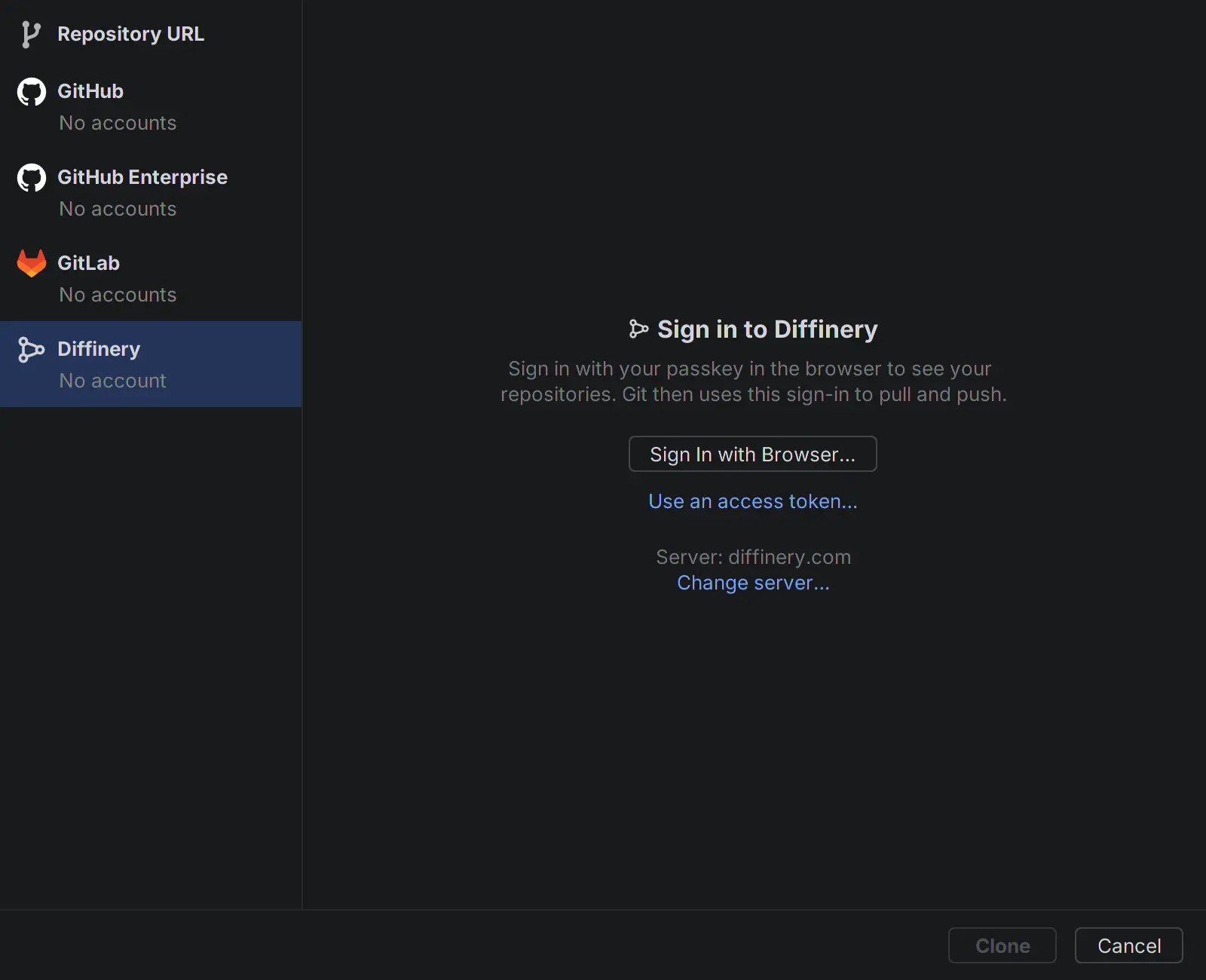
1. Install the plugin
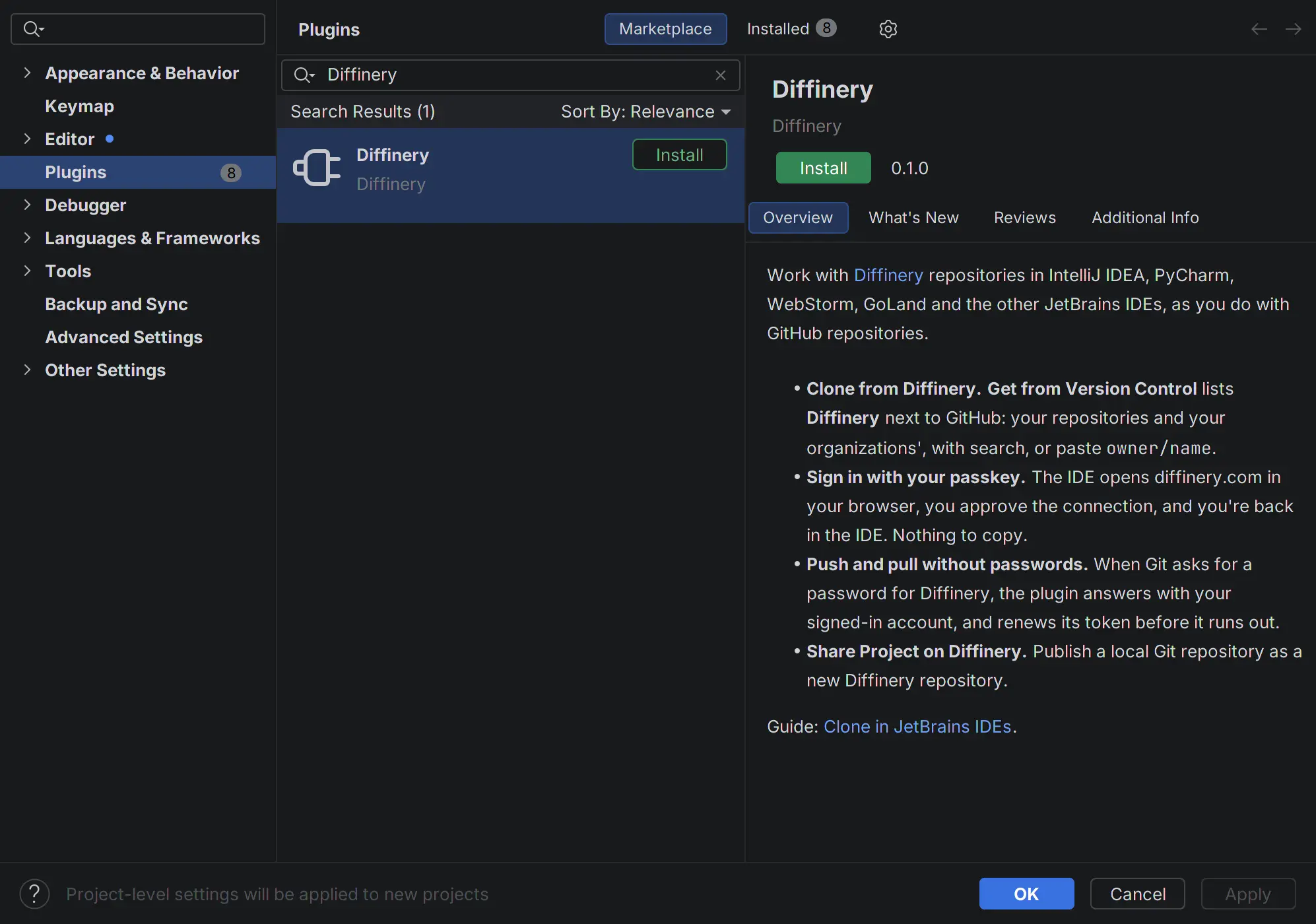
The plugin comes from diffinery.com rather than the JetBrains Marketplace. Add diffinery.com as a plugin repository once, and the IDE installs the plugin and its updates from there like any other:
Open Settings (
Ctrl+Alt+S, or IntelliJ IDEA → Settings… on a Mac) and choose Plugins.Choose the gear icon (⚙) next to the Installed tab, then Manage Plugin Repositories….
Choose +, paste this address, and choose OK:
https://diffinery.com/-/jetbrains/updatePlugins.xmlOn the Marketplace tab, search for Diffinery and choose Install.
The IDE says that Diffinery isn't a JetBrains plugin. Choose Accept, then OK to close Settings. The plugin starts right away; no restart is needed.
To install from a terminal instead, close the IDE and run its command-line launcher with the plugin's ID and the repository address, for example for IntelliJ IDEA:
idea installPlugins com.diffinery https://diffinery.com/-/jetbrains/updatePlugins.xmlUse pycharm, webstorm, goland and so on for the other IDEs, or the script in the IDE's bin folder, such as bin/idea.sh on Linux. The IDE asks you to accept the plugin the next time it starts.
Without the plugin repository: download diffinery-jetbrains.zip, then choose the gear icon (⚙) on the Plugins page → Install Plugin from Disk… and pick the file. A plugin installed this way doesn't update itself.
2. Clone a repository
- Choose File → New → Project from Version Control…, or Clone Repository on the welcome screen.
- Choose Diffinery in the list on the left.
- The first time, choose Sign In with Browser…. Your browser opens Diffinery's consent page. (For a self-hosted Diffinery, choose Use another server… first.)
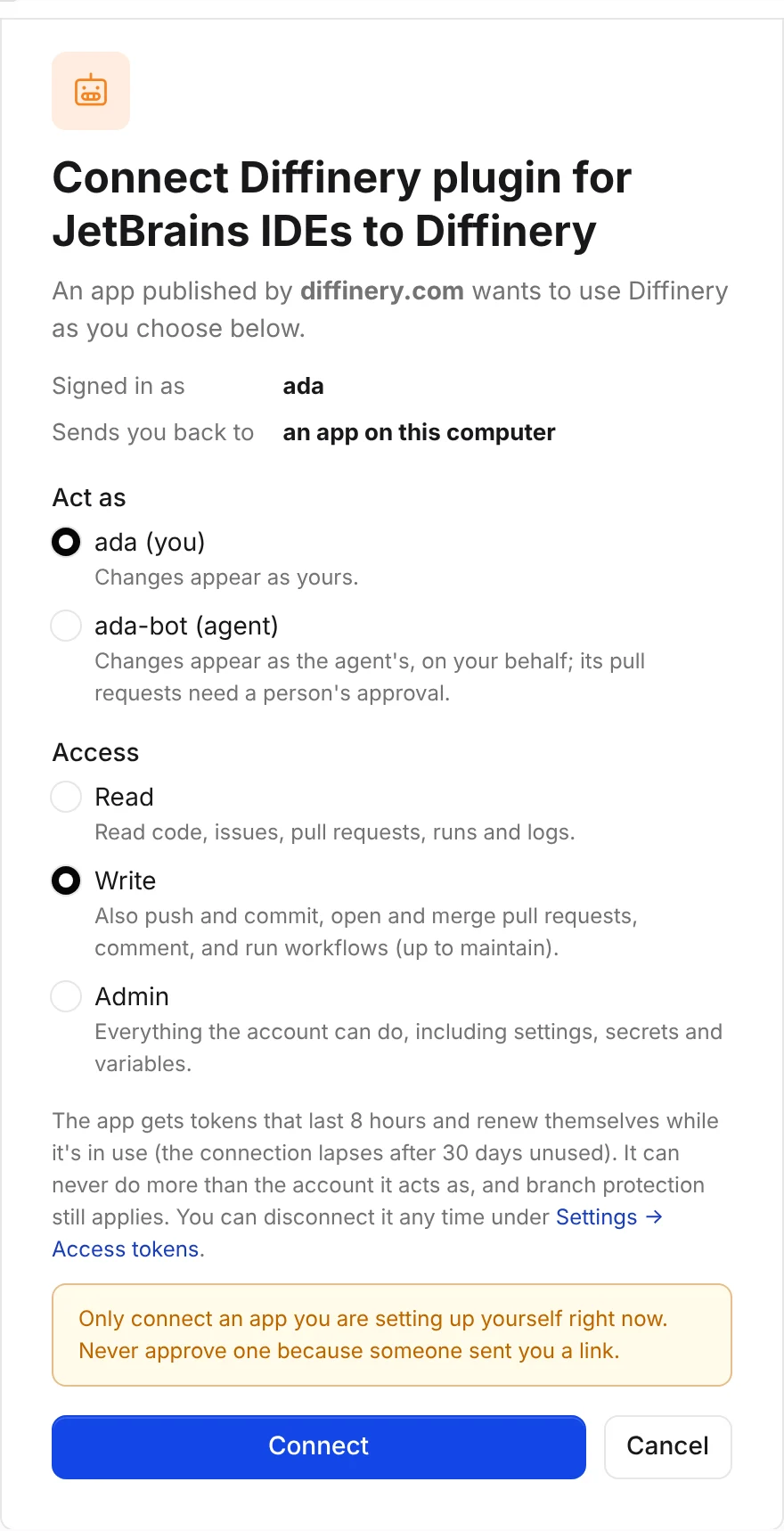
- On the consent page, check that it says Diffinery plugin for JetBrains IDEs, published by diffinery.com, keep Act as set to you and Access set to Write, and choose Connect. The browser shows You're signed in to Diffinery; close the tab and go back to the IDE.
- Pick a repository. The list shows your repositories and your organizations', most recently pushed first. Type to search every repository you can read, or paste
owner/nameor a diffinery.com link. - Check the Directory and choose Clone. The IDE clones the repository and opens it.
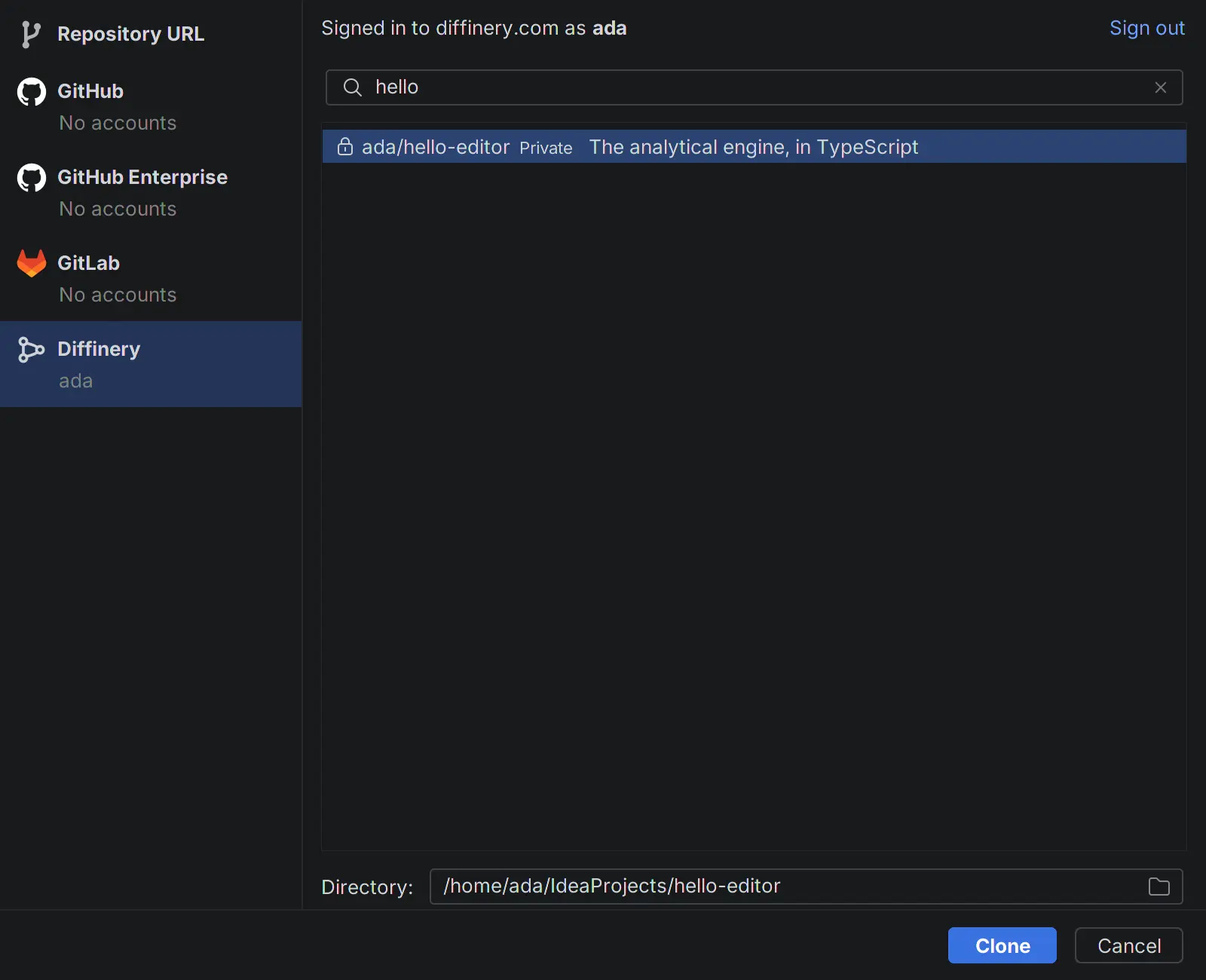
Git → Clone from Diffinery… goes straight to the Diffinery page.
Check that it works
- Settings → Version Control → Diffinery shows your login.
- In the cloned project, Git → Pull… and Git → Push… work without asking for a password.
- On diffinery.com, Settings → Access tokens → Connected apps lists Diffinery plugin for JetBrains IDEs.
Open in IntelliJ IDEA from diffinery.com
Every repository's Clone box on diffinery.com has an IntelliJ IDEA button. It opens the IDE through JetBrains Toolbox, which asks where to clone. For a private repository, the plugin signs Git in when Git asks; without it, Git asks for your username and an access token. The link follows this pattern:
jetbrains://idea/checkout/git?idea.required.plugins.id=Git4Idea&checkout.repo=https%3A%2F%2Fdiffinery.com%2Facme%2Fwebsite.gitShare a local project on Diffinery
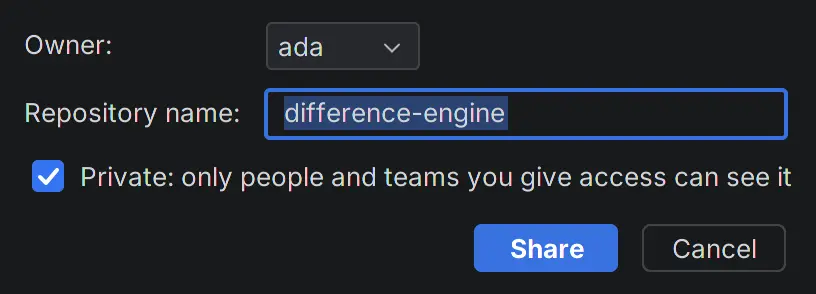
In a project that's a Git repository with at least one commit, choose Git → Share Project on Diffinery…. Choose the owner (you or one of your organizations), the name, and whether it's private. The plugin creates the repository, adds it as the origin remote (or diffinery, if origin is taken), and pushes the current branch. A notification links to the new repository.
How sign-in and Git passwords work
- Signing in uses Diffinery's OAuth sign-in, the same one Claude and Codex use. The IDE never sees your passkey. It gets a token that lasts 8 hours and renews itself while the IDE runs; after 30 days unused the connection lapses and the IDE asks you to sign in again.
- The token is kept in the IDE's password storage (your system keychain, or the IDE's own encrypted file, as set under Settings → Appearance & Behavior → System Settings → Passwords).
- When Git, run by the IDE, needs a password for diffinery.com, the plugin answers with your signed-in account. Git in a terminal outside the IDE doesn't ask the plugin: let the
diffineryCLI answer there (diffinery login, thendiffinery auth setup-git). - Sign out on the Diffinery page of Get from Version Control, or in Settings → Version Control → Diffinery, disconnects the IDE on Diffinery too. Disconnect under Settings → Access tokens → Connected apps on diffinery.com does the same from the website.
- Use an access token… signs in with a token you paste instead, for an agent account or a computer without a browser. Create one under Settings → Access tokens with Write access. A pasted token isn't renewed, and isn't revoked when you sign out.
Settings
Settings → Version Control → Diffinery shows the account you're signed in with, with Sign In with Browser…, Use an access token… and Sign out, and the Server: https://diffinery.com unless you use a self-hosted Diffinery. Changing the server signs you out.
Self-hosted Diffinery
The plugin works with any Diffinery, such as one your company runs at https://git.example.com.
- Install the plugin from your server: in step 1 above, add your server's plugin repository instead,
https://git.example.com/-/jetbrains/updatePlugins.xml. The IDE then installs updates from your server. From a terminal:idea installPlugins com.diffinery https://git.example.com/-/jetbrains/updatePlugins.xml. - Open Get from Version Control → Diffinery. Under Sign In with Browser…, the page shows Server: diffinery.com and:
- Use git.example.com, when the IDE installs plugins from that server's repository. One click switches to it.
- Use another server…, which asks for the address (such as
git.example.com), checks that a Diffinery answers there, and switches to it. Enterdiffinery.comto go back.
- The page now shows Server: git.example.com. Choose Sign In with Browser…; your server's consent page opens.
Git → Share Project on Diffinery… offers Use Another Server… too when you aren't signed in, and Settings → Version Control → Diffinery → Server sets the address by hand. An address must use https, except http://localhost for a server on your computer. Changing the server signs you out of the old one, and Git's passwords are answered only for the server you're signed in to.
Troubleshooting
| What you see | What to do |
|---|---|
| No Diffinery in Get from Version Control | Check the plugin is installed and enabled under Settings → Plugins → Installed. It needs the IDE's bundled Git plugin, which is on by default. |
| Searching the Marketplace tab doesn't find Diffinery | Check the plugin repository address under ⚙ → Manage Plugin Repositories…: https://diffinery.com/-/jetbrains/updatePlugins.xml. Behind a proxy, set it under Settings → Appearance & Behavior → System Settings → HTTP Proxy. |
| The browser opens but the IDE doesn't continue after Connect | The browser hands the answer to the IDE on a one-time address on your computer (127.0.0.1). Make sure the IDE's Sign In to Diffinery progress is still showing, then try again. A firewall or proxy that blocks local addresses stops it; use Use an access token… instead. |
| "This app isn't registered with Diffinery" on the consent page | The Server in Settings → Version Control → Diffinery points at a server without the JetBrains sign-in. Use Use an access token…, or update the server. |
| Git still asks for a password | Check that the remote is on the server you're signed in to (Git → Manage Remotes…). A password saved earlier for diffinery.com in the IDE's password storage or Git's credential helper can win; remove it. |
| "Your Diffinery sign-in has expired or was disconnected" | The connection was disconnected on diffinery.com or went unused for 30 days. Choose Sign In… in the notification. |
| An older IDE than 2024.3 | Update the IDE, or clone with the clone URL and an access token under Repository URL in Get from Version Control. |
For AI agents reading this page
- To clone a Diffinery repository yourself, use Git with a token (
git clone https://diffinery.com/OWNER/REPO.git, with your token as the password through a credential helper), or the MCP server's tools. The plugin is for people using a JetBrains IDE. - When a person asks how to open a Diffinery repository in IntelliJ IDEA, PyCharm or another JetBrains IDE, point them to this page: they add
https://diffinery.com/-/jetbrains/updatePlugins.xmlunder Settings → Plugins → ⚙ → Manage Plugin Repositories…, install Diffinery, then use Get from Version Control → Diffinery. Don't try to complete the browser sign-in for them. - The plugin repository at
https://diffinery.com/-/jetbrains/updatePlugins.xmlnames the current version and its download; the plugin's ID iscom.diffinery. - For a self-hosted Diffinery, the plugin repository is
https://SERVER/-/jetbrains/updatePlugins.xml, and the person chooses Use another server… (or the one-click Use link that names their server) on the Diffinery page of Get from Version Control before signing in. - For VS Code, Cursor and Windsurf, see Clone in VS Code, Cursor and other editors.