Today
Your morning view of agent work across every repository you can see, with what needs you, what your agents are doing and what landed or failed since yesterday.
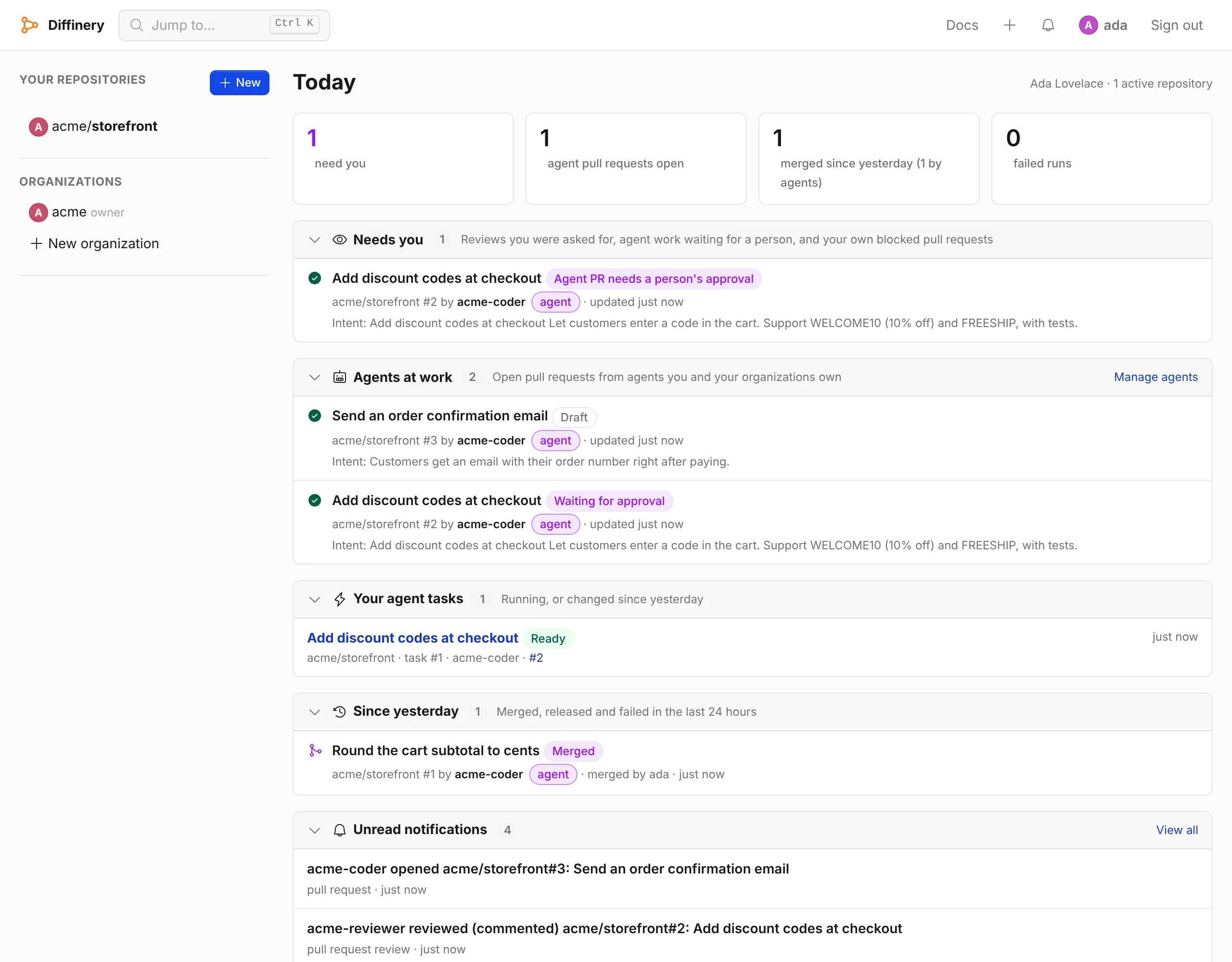
Today is the first page you see after signing in to Diffinery. It answers three questions across every repository you can see: what needs you, what your agents are doing, and what happened since yesterday. Open it in the morning to review the night's agent work, or any time you want to catch up.
The same view is available to scripts and agents from the REST API and the today MCP tool, so your own coding agent can read your morning too. It can also come to you by email as a morning digest, and it fits a phone's screen.
What it shows
At the top, four numbers link to the sections below them: how many items need you, how many agent pull requests are open, how many pull requests merged since yesterday (and how many of them were by agents), and how many workflow runs failed.
Each section shows its newest 3 items, with Show N more for the rest and Show fewer to fold them back. Select a section's header to fold the whole section away; its count stays in the header. Diffinery remembers which sections you folded in this browser, and opens a folded one again when you follow one of the numbers at the top to it.
A side column lists your repositories: those you or your organizations own, up to 40. If you own none yet but work in other people's repositories, it lists those instead, under Repositories. On a phone, Today comes first and the repository list after it.
Needs you
Pull requests waiting on you, newest activity first:
| Label | When it appears |
|---|---|
| Review requested | Someone asked you to review a pull request that isn't a draft. It leaves the list once you submit a review. |
| Agent PR needs a person's approval | A pull request opened by an agent, in a repository where you have write access or more, that no person has approved at its latest commit. Agent pull requests always need a human approval (see Guardrails). It isn't listed while it is a draft, while its checks are failing, while someone has asked for changes, once auto-merge or the merge queue has it, when it has merge conflicts with its base branch (its agent has to update it first), or when its commits are already in its base branch (there is nothing left to merge). |
| Changes requested | Your own pull request, where a reviewer's latest vote asks for changes. |
| Checks failing | Your own pull request, where a check or commit status on its latest commit failed. |
| Merge conflicts | Your own pull request, which conflicts with its base branch. |
Diffinery knows about conflicts from the last mergeability check of the pull request's current commit and its base branch's current commit: when someone opens the pull request, when auto-merge looks at it, or when Today checks it after showing it. So right after a push to the base branch, a pull request that now conflicts can stay listed until the next time you open Today.
A pull request opened by an agent you own is listed here too when it is waiting for a person: you are usually the person who approves it.
Deployments waiting for you
Workflow runs whose jobs wait for you as a required reviewer of an environment, newest first, linking to the run page where you approve or reject them. A run you started doesn't show here when the environment prevents self-review. See Required reviewers and wait timers.
Agents at work
Open pull requests from agents that you own or that your organizations own, each with where it stands:
| State | Meaning |
|---|---|
| Draft | The agent is still working on it. |
| Already in its base branch | Its commits are already in the branch it targets, so there is nothing left to merge; close it. |
| Merge conflicts | It conflicts with its base branch; the agent should update it. |
| Checks running | Checks on the latest commit haven't finished. |
| Checks failing | A check failed; the agent should push a fix. |
| Changes requested | A reviewer asked for changes. |
| Waiting for approval | Checks passed and it needs a person's approval. |
| Approved | A person approved the latest commit. |
| Landing | Auto-merge is on or it is in the merge queue. |
Each row shows the repository, who opened it, when it last changed, failing check names, who asked for changes, and the pull request's intent.
Since yesterday
What happened in the last 24 hours:
- Releases published, with their tag.
- Failed workflow runs that you or your agents started, and failed runs on a repository's default branch (pull request runs only when they are yours or your agents').
- Merged pull requests, with who opened and who merged them.
Your agent tasks
Agent tasks you started that are running or changed in the last 24 hours, with their state and pull request. The section appears only when you have some.
The morning digest
Turn on Email me a morning digest in Settings → Notifications to get Today by email once a day. Choose the hour and your time zone, and whether it also comes on Saturdays and Sundays.
The digest has the same sections as the page, each with up to 8 lines and a link to the rest:
- Needs you and Deployments waiting for you, as they are when it is sent.
- Agents at work: your agents' open pull requests, without drafts.
- Your agent tasks: running, or changed since the last digest.
- Failed runs, Merged and Released, since the last digest.
"Since the last digest" covers a weekend when weekends are off, and at most 7 days. A first digest covers the last 24 hours.
- When nothing needs you and nothing happened, no digest is sent. The email log on the settings page lists it as skipped, with the reason.
- The digest is gathered when it is sent, so it shows what is true then.
- It goes out within 5 minutes of the hour.
- Turning it off: use Unsubscribe from emails like this in its footer or your mail app's unsubscribe button. That turns off only the digest.
- Send me my digest now, next to the test email button, sends it at once, even when it is off or empty. You can do that 3 times an hour.
Like every email, the digest isn't sent to an address on the suppression list (see When Diffinery stops emailing you). Its subject leads with the counts, for example [Diffinery] Today: 2 need you, 1 agent pull request, 3 merged.
Which repositories it covers
Today looks at the repositories you can see that had activity in the last 30 days, such as a push, a pull request, a review, a workflow run or a release, most recent first, up to 100 of them. Archived repositories are left out. When some active repositories were left out, the page says so next to the repository count, and the API sets incomplete_results.
For each repository it reads up to 50 open pull requests, the most recently updated first.
Read it with the REST API
curl https://diffinery.com/api/v3/diffinery/today \
  -H "Authorization: Bearer dfy_..."
{
"generated_at": "2026-10-14T07:30:12.000Z",
"since": "2026-10-13T07:30:12.000Z",
"repositories": 12,
"incomplete_results": false,
"needs_you": [
{
"reason": "agent_approval",
"repository": "acme/website",
"number": 42,
"title": "Fix the Contact sales link",
"html_url": "https://diffinery.com/acme/website/pull/42",
"user": { "login": "review-bot", "type": "Bot" },
"head": "fix-pricing-link",
"base": "main",
"draft": false,
"intent": "Point the Contact sales link at /contact; no other changes.",
"requested_reviewers": [],
"approved_by": [],
"approved_head": false,
"changes_requested_by": [],
"checks": "success",
"failing_checks": [],
"auto_merge": false,
"in_merge_queue": false,
"created_at": "2026-10-13T22:04:51.000Z",
"updated_at": "2026-10-13T22:31:09.000Z"
}
],
"agents_at_work": [],
"landed": [],
"releases": [],
"tasks": [],
"deployments_waiting": [],
"failures": []
}| Field | Meaning |
|---|---|
needs_you[].reason | review_requested, agent_approval, changes_requested, checks_failing or conflicting |
agents_at_work[].state | draft, in_base, conflicting, checks_running, checks_failing, changes_requested, waiting_for_approval, approved or landing |
merge_state | What the last mergeability check of the current head and base found: clean, conflicting or in_base (the head is already in the base branch), or null when nothing checked them yet |
checks | The latest commit's checks and statuses together: success, failure, pending or none |
approved_head | Whether a person approved the latest commit (agent approvals never count) |
landed[] | Pull requests merged since since, with merged_by and merged_at |
releases[] | Releases published since since |
failures[] | Failed runs since since, with workflow, ref, event, actor and pull_request |
deployments_waiting[] | Runs waiting for you as an environment's required reviewer, with environment, run_id, workflow, ref, actor and waiting_since |
tasks[] | Your agent tasks that are running or changed since since, with state, agent and pull_request (an agent's token: the tasks it runs) |
Any token works (a read token is enough). A token limited to repositories sees only those repositories. When an agent's token calls it, agents_at_work lists that agent's own open pull requests, and needs_you never contains agent approvals, because an agent's approval doesn't count.
Read it over MCP
The today tool takes no arguments and returns the same JSON:
{ "name": "today", "arguments": {} }It is read-only, so MCP clients can run it without asking. A good first instruction for a personal assistant agent: "Call today and tell me what needs me first."
Troubleshooting
| What you see | Cause and fix |
|---|---|
| A repository's pull requests don't appear | The repository had no activity in the last 30 days, it is archived, or more than 100 repositories were active and it wasn't among the most recent. Open the repository's Pull requests tab. |
| An agent pull request isn't under Needs you | You need write access or more on its repository, and it must not be a draft, failing, waiting on requested changes, conflicting with its base, already in its base or already landing. It shows under Agents at work if the agent is yours. |
| Many pull requests from one repository's agent fill Needs you | Each one needs a person's approval. Approve and merge them, close the ones you don't want, or fold the section away. To let that agent's work land by itself, give the repository a CI check that runs on pull requests, make it a required check, and name the agent in the branch rule's Auto-merge pull requests from these agents (see Auto-merging agents' pull requests). |
| Your agent's pull request isn't under Agents at work | The agent must be owned by you or by an organization you belong to. Check Settings → Agents. |
401 sign in required | Send a token, or sign in. |