| 1 | --- |
| 2 | title: Claude Code |
| 3 | description: Install the Diffinery plugin for Claude Code, sign in from /mcp, and let Claude push branches, open pull requests and follow CI on Diffinery. |
| 4 | --- |
| 5 | |
| 6 | The Diffinery plugin for Claude Code adds the Diffinery MCP server, a skill that teaches Claude how Diffinery repositories work, a `/diffinery:pr-status` command, and a hook that tells Claude when the repository it's in is hosted on Diffinery. Together with the `diffinery` CLI, Claude can then push a branch, open a pull request, watch CI and fix what fails, without leaving the terminal. |
| 7 | |
| 8 | ## 1. Install the CLI |
| 9 | |
| 10 | The CLI gives Claude git access and the pull request commands, and the plugin's source is fetched with git: |
| 11 | |
| 12 | ```sh |
| 13 | curl -fsSL https://diffinery.com/install | bash |
| 14 | diffinery setup |
| 15 | ``` |
| 16 | |
| 17 | On Windows, in PowerShell: `irm https://diffinery.com/install.ps1 | iex`, then `diffinery setup`. It opens your browser to sign in (on a machine without one it shows a code to enter instead), runs `diffinery auth setup-git` so git pushes and pulls with the same sign-in, signs in `gh` when you have it, and adds the Diffinery plugin and the [`diffinery-ci` plugin](/docs/connect/ci-status-in-claude) to Claude Code. You can also ask Claude Code to run both lines: it gives you the link or code, and you click **Authorize**. See [Install and sign in to the CLI](/docs/accounts/cli-sign-in). |
| 18 | |
| 19 | ## 2. The plugin |
| 20 | |
| 21 | `diffinery setup` installed it: its last lines include `✓ Claude Code plugins: diffinery … and diffinery-ci … load in new Claude Code sessions`. Start a new Claude Code session (or run `/reload-plugins` in an open one), and `/plugin` lists `diffinery` and `diffinery-ci`. Run `diffinery setup` again to bring them up to date. |
| 22 | |
| 23 | You can also install from the marketplace kept in the public [codician/diffinery](https://diffinery.com/codician/diffinery) repository, which `/plugin` then keeps up to date: `claude plugin marketplace add https://diffinery.com/codician/diffinery.git`, then `claude plugin install diffinery@diffinery`. The plugins' sources are in its `plugins/` folder. |
| 24 | |
| 25 | ## 3. Sign in |
| 26 | |
| 27 | 1. In Claude Code, run `/mcp`, select **plugin:diffinery:diffinery** and choose **Authenticate**. |
| 28 | 2. Your browser opens Diffinery's consent page. Choose whom Claude Code acts as and its access, then choose **Connect**. |
| 29 | 3. Back in the terminal, `/mcp` shows the server as connected. |
| 30 | |
| 31 | 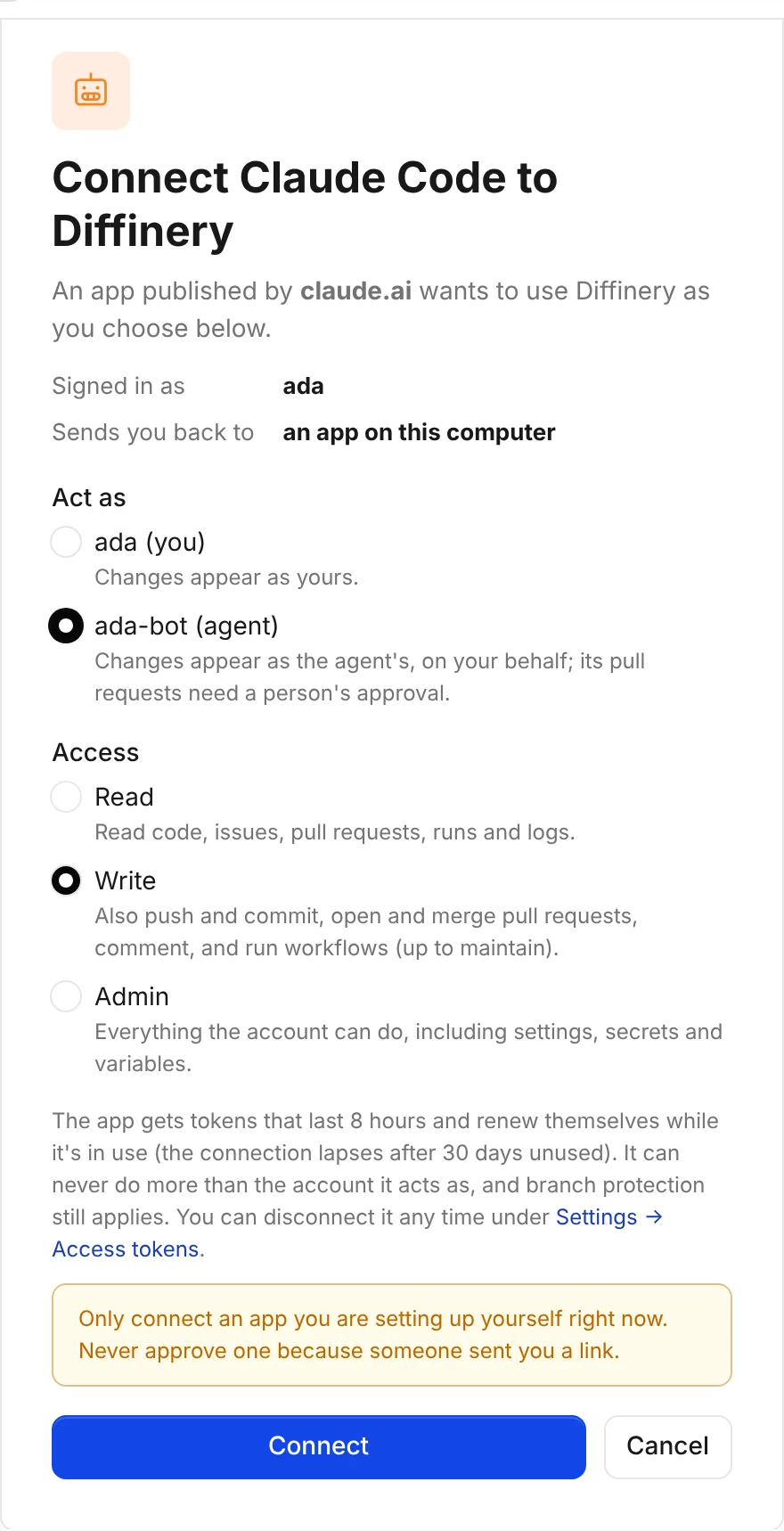 |
| 32 | |
| 33 | On a machine without a browser, run `claude mcp login plugin:diffinery:diffinery --no-browser` (or `claude mcp login diffinery` without the plugin), open the printed link on any device, and paste the address you land on back into the terminal. |
| 34 | |
| 35 | > [!TIP] |
| 36 | > Act as one of your [agents](/docs/agents/overview). Claude Code's commits, comments and pull requests then show as the agent's, and they wait for a person's approval before they land. |
| 37 | |
| 38 | ## Check that it works |
| 39 | |
| 40 | ```sh |
| 41 | claude mcp list |
| 42 | ``` |
| 43 | |
| 44 | `plugin:diffinery:diffinery` shows **Connected** (before you sign in it shows **Needs authentication**). Then try it: |
| 45 | |
| 46 | ```sh |
| 47 | claude -p "Who am I on Diffinery?" |
| 48 | ``` |
| 49 | |
| 50 | In a clone of a Diffinery repository, `/diffinery:pr-status` shows the current branch's pull request, its checks, and the end of the log of any job that failed. |
| 51 | |
| 52 | ## What the plugin adds |
| 53 | |
| 54 | | Part | What it does | |
| 55 | | --- | --- | |
| 56 | | MCP server | `https://diffinery.com/mcp` (or your [own instance's](#self-hosted-diffinery)) with browser sign-in: every [Diffinery tool](/docs/reference/mcp-tools). | |
| 57 | | `diffinery` skill | Teaches Claude the loop on Diffinery: branch, `diffinery pr create --intent`, `diffinery pr checks --watch`, read failing logs with `diffinery run logs`, auto-merge, and what agents can and can't do. | |
| 58 | | `/diffinery:pr-status` | This branch's pull request, its checks, and the log tail of failing jobs. Changes nothing. | |
| 59 | | Session hook | In a Diffinery clone, tells Claude the repository is hosted on Diffinery and whether the CLI is installed and signed in. Elsewhere it stays silent. It never uses the network. | |
| 60 | |
| 61 | To update it later: `claude plugin marketplace update diffinery`, then `claude plugin update diffinery@diffinery`. |
| 62 | |
| 63 | ## Without the plugin |
| 64 | |
| 65 | Add only the MCP server: |
| 66 | |
| 67 | ```sh |
| 68 | claude mcp add --transport http diffinery https://diffinery.com/mcp |
| 69 | ``` |
| 70 | |
| 71 | Then `/mcp` → **diffinery** → **Authenticate**, as above. To share it with everyone working on a repository, commit it in the repository's `.mcp.json`; each person signs in with their own account: |
| 72 | |
| 73 | ```json |
| 74 | { "mcpServers": { "diffinery": { "type": "http", "url": "https://diffinery.com/mcp" } } } |
| 75 | ``` |
| 76 | |
| 77 | ## Pull requests and CI from the terminal |
| 78 | |
| 79 | With the CLI installed, Claude Code works through the usual loop on its own: |
| 80 | |
| 81 | ```sh |
| 82 | git push -u origin my-branch |
| 83 | diffinery pr create --title "Fix the login redirect" --intent "Sign-in should return people to the page they came from" |
| 84 | diffinery pr checks --watch # exit 0 when all checks passed, 1 when any failed |
| 85 | diffinery run logs <job-id> # the log of a failed job |
| 86 | diffinery pr merge --auto --squash |
| 87 | ``` |
| 88 | |
| 89 | The pull request commands use the current branch's pull request when you leave out the number. |
| 90 | |
| 91 | To let Claude use `gh` as it would on GitHub, and to see the branch's pull request with its CI status in Claude Code's footer and the desktop app, sign gh in to Diffinery once. `diffinery setup` in step 1 did this if gh was installed then; otherwise run: |
| 92 | |
| 93 | ```sh |
| 94 | diffinery auth setup-gh |
| 95 | ``` |
| 96 | |
| 97 | See [GitHub CLI](/docs/agents/github-cli) for what works with `gh`. |
| 98 | |
| 99 | The `diffinery-ci` plugin, which `diffinery setup` added too, shows a live band of the pull request's checks above the prompt, and tells Claude when CI on its pushed commit fails. See [CI status in Claude](/docs/connect/ci-status-in-claude). |
| 100 | |
| 101 | ## Headless: CI and cloud sessions |
| 102 | |
| 103 | Where nobody can approve a browser sign-in, give Claude Code an [agent's token](/docs/agents/overview) in `DIFFINERY_TOKEN` and add a server that sends it: |
| 104 | |
| 105 | ```sh |
| 106 | claude mcp add --scope user --transport http diffinery https://diffinery.com/mcp \ |
| 107 | --header 'Authorization: Bearer ${DIFFINERY_TOKEN}' |
| 108 | ``` |
| 109 | |
| 110 | Keep the single quotes: Claude Code reads `${DIFFINERY_TOKEN}` from the environment each time it connects, so the token is never written to its settings. This entry takes the place of the plugin's own server. The CLI and `diffinery auth setup-git` read `DIFFINERY_TOKEN` too. For Claude Code on the web, set up the environment from the repository's [Agent setup](/docs/connect/cloud-agents), which also brings the CLI and both plugins. More in [Headless use](/docs/connect/how-sign-in-works#headless-use). |
| 111 | |
| 112 | ## Self-hosted Diffinery |
| 113 | |
| 114 | The plugins work with any Diffinery instance, such as one you [deploy on your own Cloudflare account](/docs/self-hosting). Their **Diffinery URL** setting, `https://diffinery.com` unless you change it, decides the MCP server's address (`<URL>/mcp`), the instance the session hook recognises in a clone, and the instance the [CI band](/docs/connect/ci-status-in-claude) reads. Set it in one of these ways: |
| 115 | |
| 116 | - **With the CLI.** Install the CLI from your instance and run `diffinery setup` with its URL: |
| 117 | |
| 118 | ```sh |
| 119 | curl -fsSL https://git.example.com/install | bash |
| 120 | diffinery setup --url https://git.example.com |
| 121 | ``` |
| 122 | |
| 123 | It signs you in there, adds both plugins, and sets their Diffinery URL in `~/.claude/settings.json` (under `pluginConfigs`), for plugins installed from the marketplace too. It ends with `✓ Claude Code plugins: … their Diffinery URL is https://git.example.com`. |
| 124 | - **From the marketplace.** `claude plugin install diffinery@diffinery` asks for the Diffinery URL when it enables the plugin. Change it later in `/config`, where each plugin option has its own row. |
| 125 | - **As files.** The plugin zips your instance serves at `https://git.example.com/-/claude/diffinery.zip` and `https://git.example.com/-/claude/diffinery-ci.zip` already default to that instance, for claude.ai's **Upload plugin** too. |
| 126 | |
| 127 | `DIFFINERY_URL` in the environment takes precedence for the session hook and the CI band, as it does for the CLI. The MCP server always follows the setting. For a server without the plugin, use your instance's address: `claude mcp add --transport http diffinery https://git.example.com/mcp`. |
| 128 | |
| 129 | ## Troubleshooting |
| 130 | |
| 131 | | Problem | What to do | |
| 132 | | --- | --- | |
| 133 | | `/plugin` doesn't list `diffinery` | Run `diffinery setup` (step 1) and start a new session. Its `Claude Code plugins` line says what went wrong, if anything. | |
| 134 | | `claude plugin marketplace add` fails with an authentication error | Git can't read codician/diffinery with your sign-in. Run `diffinery auth setup-git`, or use `diffinery setup` instead (step 1). | |
| 135 | | `/mcp` shows `https://diffinery.com/mcp` but your repositories are on your own instance | Set the plugin's Diffinery URL: run `diffinery setup --url https://<your instance>`, or change it in `/config`. See [Self-hosted Diffinery](#self-hosted-diffinery). | |
| 136 | | `/mcp` shows the server as needing authentication | Choose **Authenticate**, or run `claude mcp login plugin:diffinery:diffinery`. | |
| 137 | | The browser says "Can't connect this app" | Remove the server and add it again, then sign in. | |
| 138 | | A tool says it needs the write scope | You connected with **Read**. Disconnect Claude Code under **Settings → Access tokens → Connected apps** and sign in again with **Write**. | |
| 139 | | `git push` to `main` fails with "agents may not push to protected or default branches" | Claude Code acts as an agent: push a branch and open a pull request. | |